
The Ultimate Guide to Remove Background from Image HD: Professional Secrets for E-commerce
Master the art of high-definition background removal. Learn how to maintain edge sharpess, handle complex textures, and use AI to generate studio-quality HD product images.
In the competitive world of e-commerce, the difference between a "scroll-past" and a "click-to-buy" often comes down to a single factor: image quality. When we talk about high-definition (HD) product photography, we aren't just talking about pixel count. We are talking about the precision of the silhouette, the absence of jagged "staircase" edges, and the preservation of micro-details like fabric fibers or hair.
Learning how to remove background from image HD files is no longer just a luxury for high-end brands; it is a fundamental requirement for anyone selling on Amazon, Shopify, or Etsy. A poorly cut-out image looks amateurish, erodes trust, and ultimately kills conversions.
Why "HD" Background Removal is Different
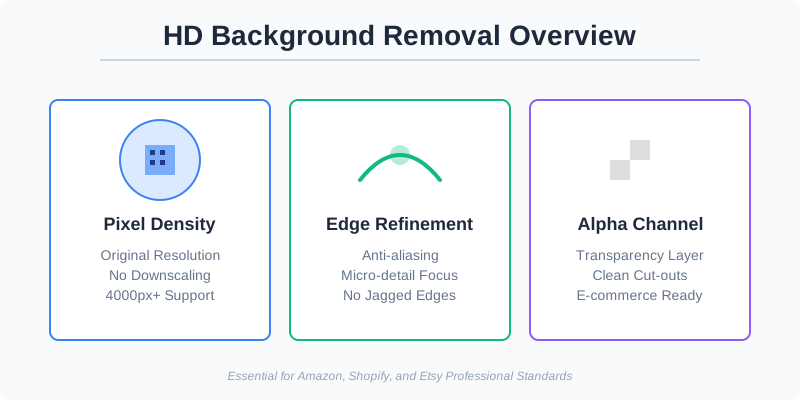
Most free online tools claim to remove backgrounds, but they often downscale your 4000px professional shot to a blurry 600px preview. This is the "low-def" trap. HD background removal requires maintaining the original resolution while ensuring the Alpha channel (the transparency layer) is as sharp as the original image data.
When you remove a background in HD, you are looking for three specific markers of quality:
- Edge Anti-aliasing: No harsh white pixels or halos around the product.
- Detail Retention: Wisps of hair, jewelry facets, and mesh textures remain intact.
- Color Integrity: No "color bleed" from the original background reflecting on the edges of the product.
The Science of Pixels and Alpha Channels
To truly understand HD removal, we must look at the "Alpha Channel." In a standard RGB image, you have Red, Green, and Blue channels. An HD transparent image adds a fourth channel: Alpha. This channel dictates the opacity of every single pixel. In low-quality removal, this channel is binary (either 0% or 100% opaque), which causes the "staircase" effect. In professional HD removal, the Alpha channel supports 256 levels of transparency, allowing for smooth transitions that blend perfectly into any new background.
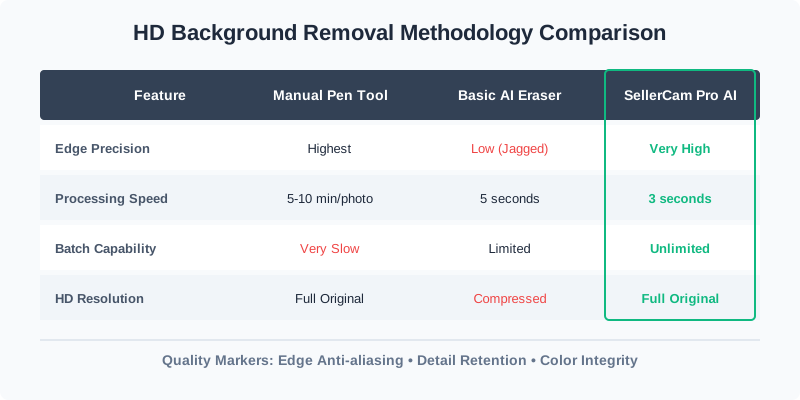
Comparing High-Definition Methods
Not all background removal techniques are created equal. Depending on your volume and budget, you might choose between manual masking, automated AI, or professional services.
| Feature | Manual Pen Tool (Photoshop) | Basic AI Eraser | SellerCam Pro AI |
|---|---|---|---|
| Edge Precision | Highest (Manual control) | Low (Often jagged) | Very High (Edge-aware) |
| Processing Speed | 5-10 minutes per photo | 5 seconds | 3 seconds |
| Batch Capability | Very slow | Limited | Unlimited |
| HD Resolution | Full Original | Usually compressed | Full Original |
| Cost | High (Time/Subscription) | Free/Cheap | Competitive |
The Technical Challenges of HD Transparency
When you zoom into a high-definition image—say, a 20-megapixel shot of a luxury watch—the transition between the metal casing and the background isn't a solid line. It’s a gradient of semi-transparent pixels.
If a tool simply "cuts" the image, it creates a "aliasing" effect. Professional HD removal uses a technique called "Global Refinement," which analyzes these edge pixels to determine what percentage belongs to the product and what belongs to the background.
Handling Complex Textures in HD
One of the biggest challenges in HD removal is dealing with semi-transparent or "fuzzy" objects.
- Hair and Fur: These require "Matting" algorithms that can distinguish between a strand of hair and a background pixel of a similar color.
- Glass and Liquids: HD removal must preserve the refractive properties. A glass bottle should still look like glass, meaning some of the background "light" needs to be retained or intelligently replaced.
- Mesh and Lace: These items have thousands of tiny "holes." Manual removal is impossible, and basic AI fails. HD-specific AI uses deep learning to identify these patterns and apply transparency to the gaps accurately.
Common Pitfalls in Background Removal
Many sellers make the mistake of thinking a white background is the same as a removed background. If you simply paint over the background with white, you lose the ability to place that product into lifestyle scenes later. True HD removal creates a transparent PNG or WebP file that allows for infinite flexibility.
| Issue | Visual Result | Solution |
|---|---|---|
| Halo Effect | A thin white or colored line around the object | Use "Contract Selection" or AI Edge Refinement |
| Pixelation | Jagged edges when zoomed in | Ensure the tool supports 300 DPI output |
| Loss of Shadow | The product looks like it's "floating" unnaturally | Use AI to regenerate contact shadows |
Step-by-Step: How to Achieve HD Results
Achieving a professional look doesn't require a degree in graphic design anymore, but it does require a process. Here is the workflow used by high-volume e-commerce studios.
1. Source Image Preparation
Start with the highest resolution possible. Even if the final marketplace only requires 2000px, starting with 4000px gives the AI more data to work with, resulting in a cleaner "cut." Avoid using digital zoom on your smartphone; instead, move closer to the object or use the optical telephoto lens.
2. Lighting for Better Extraction
The secret to easy HD background removal is contrast. If you are shooting a white sneaker, don't shoot it on a white background. Use a light gray or soft blue. The AI needs to "see" the edge clearly. High-definition sensors are sensitive to "light wrap," where light from the background spills onto the product. Minimize this by keeping the product at least 3 feet away from the backdrop.
3. The Extraction Process
Using a tool like SellerCam, you upload the raw file. The AI doesn't just look for color differences; it identifies the geometry of the object. For HD results, ensure you select the "High Fidelity" or "Pro" mode which bypasses standard compression.

4. Edge Refinement and Masking
For complex items like a fuzzy sweater or a mesh chair, look for tools that offer "Refine Edge" brushes. This allows you to manually tell the AI where the transparency should be more aggressive. In HD, even a 2-pixel error is visible to the customer.
Marketplace Standards for HD Images
Every platform has its own definition of "High Quality." If you are removing backgrounds for a specific marketplace, you must adhere to their technical specifications to avoid your listings being suppressed.
Amazon's Strict HD Requirements
Amazon is the most demanding. Their "Main Image" must be on a pure white background (RGB 255, 255, 255). If your HD removal leaves even a hint of light gray (RGB 254), their automated systems might flag it. Furthermore, the product must occupy 85% of the frame. HD removal allows you to crop tightly without losing detail.
Shopify and Custom E-commerce
On your own site, you have more freedom. Many modern brands use "Soft Gray" or "Off-White" (#F5F5F5) to reduce eye strain. HD transparency is vital here because it allows you to change the site's theme color without re-uploading thousands of product photos.
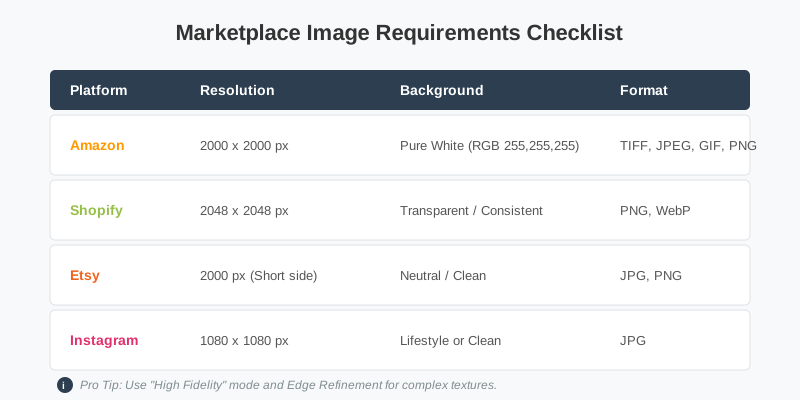
| Platform | Recommended Resolution | Background Requirement | File Format |
|---|---|---|---|
| Amazon | 2000 x 2000 px | Pure White (RGB 255, 255, 255) | TIFF, JPEG, GIF, PNG |
| Shopify | 2048 x 2048 px | Transparent or Consistent Color | PNG, WebP |
| Etsy | 2000 px (Short side) | Neutral/Clean | JPG, PNG |
| Instagram Shop | 1080 x 1080 px | Lifestyle or Clean | JPG |
Advanced Pro Tips for HD Background Removal
If you want your images to look like they were shot in a $5,000-a-day studio, keep these "insider" tips in mind:
- The "Feathering" Secret: Never leave an edge at 0px softness. A subtle 0.5px or 1px feather makes the product look like it naturally belongs in its new environment. Hard edges look like "stickers."
- Color Spill Correction: If you shot a silver product on a green screen, the edges will have a green tint. Professional HD tools include "De-contamination" features to neutralize these reflections.
- Don't Forget the Contact Shadow: A product with a perfectly removed background often looks "fake." Adding a tiny, soft shadow where the product touches the ground (the contact shadow) grounds the object in reality.
- Smart Upscaling: If your original photo isn't quite HD, use an AI Upscaler before removing the background. This gives the removal engine more pixels to analyze for the edge detection.
Pro Tip: When using SellerCam, try the "Studio" mode after removing the background. It automatically adds a natural contact shadow that scales perfectly with your HD resolution, saving you 15 minutes of Photoshop work.
Case Study: Jewelry and High-Definition Precision
Jewelry is the ultimate test for background removal. A diamond ring has hundreds of facets, each reflecting the original background. A low-quality tool will "eat" into the prongs of the ring or blur the sparkle.
To handle this in HD:
- Shoot with a Macro Lens: Capture the micro-details.
- Use Path-Based AI: This identifies the hard geometric lines of the metal.
- Manual Cleanup: Always zoom in to 400% to check the "loops" in chains or the gaps in earring backings. HD customers expect to see the shine, not the artifacts of a bad crop.
Frequently Asked Questions (FAQ)
Does removing the background reduce image quality?
If you use the right tools, no. However, many "free" web-based tools compress your image to save server space. Always check the file size before and after. An HD PNG should generally be between 2MB and 8MB depending on the complexity.
What is the best file format for HD transparent images?
For web use, WebP is becoming the standard because it offers high-definition transparency at a much smaller file size than PNG. For archival purposes or print, TIFF or PSD are preferred.
Can I remove backgrounds in batch while maintaining HD quality?
Yes. Modern AI platforms like SellerCam are designed for batch processing. The AI applies the same high-resolution logic to 100 images simultaneously, ensuring consistency that a human editor couldn't match in the same timeframe.
How do I handle "flyaway" hairs in HD portraits?
This is the "final boss" of background removal. Use a tool with a "Refine Hair" feature. It uses a specialized neural network trained specifically on the texture of hair to create a soft, realistic mask.
Integrating AI into Your High-Def Workflow
The "Manual vs. AI" debate is over. Modern AI, like the engine powering SellerCam, can now outperform human editors in 95% of scenarios, especially when it comes to speed and consistency across thousands of images.
The real value of AI in HD background removal is consistency. When a customer browses your collection, they shouldn't see different "cut styles." AI ensures that every product—from a pair of sunglasses to a complex lace dress—is treated with the same mathematical precision.
The Future: Generative Backgrounds
Once you have mastered HD removal, the next step is AI generation. Instead of just a white background, you can use the HD cutout to place your product in a "virtually staged" environment—a marble countertop for a skincare bottle or a sun-drenched patio for outdoor furniture. Because your initial removal was HD, these composites look indistinguishable from real photography.

Conclusion: Elevate Your Brand with HD Visuals
Removing the background from an image in HD is about more than just "cleaning up" a photo. It's about creating a versatile asset that can be used on your website, in social media ads, and on global marketplaces.
By prioritizing high-resolution output, edge precision, and natural shadowing, you transform a simple product shot into a powerful sales tool. High-definition visuals signal to the customer that you care about quality, which translates directly to the perceived value of your product. Don't let low-quality "free" tools degrade your brand's hard-earned reputation.
Ready to see the difference that professional-grade AI can make? Try SellerCam's AI camera and background remover today to experience true HD quality with zero effort. Your products deserve to be seen in high definition, with every detail preserved and every edge perfected.
Author

Categories
More Posts

The Ultimate Guide to Amazon Photo Editing Software: High-Converting Images Without the Complexity
Discover the best Amazon photo editing software and AI tools to meet strict image requirements, boost click-through rates, and scale your ecommerce business efficiently.

Ghost Mannequin Photography Near Me: Why Local Studios Are Being Replaced by AI
Searching for ghost mannequin photography near you? Discover why e-commerce brands are shifting from expensive local studios to AI-powered invisible mannequin solutions.

Ghost Mannequin vs. On-Model Images: Which Drives Higher Shopify Conversions?
Discover the impact of ghost mannequin photography versus live model images on Shopify conversion rates. Learn which style fits your brand, cost implications, and how AI is changing the game.
Newsletter
Join the community
Subscribe to our newsletter for the latest news and updates