Ghost Mannequin vs. On-Model Images: Which Drives Higher Shopify Conversions?
Discover the impact of ghost mannequin photography versus live model images on Shopify conversion rates. Learn which style fits your brand, cost implications, and how AI is changing the game.
In the hyper-competitive world of Shopify fashion retail, the split-second decision a customer makes when landing on a product page is almost entirely dictated by imagery. You’ve likely faced the dilemma: do you invest in expensive live model shoots to build a "lifestyle" brand, or do you opt for the clean, structured look of ghost mannequin photography?
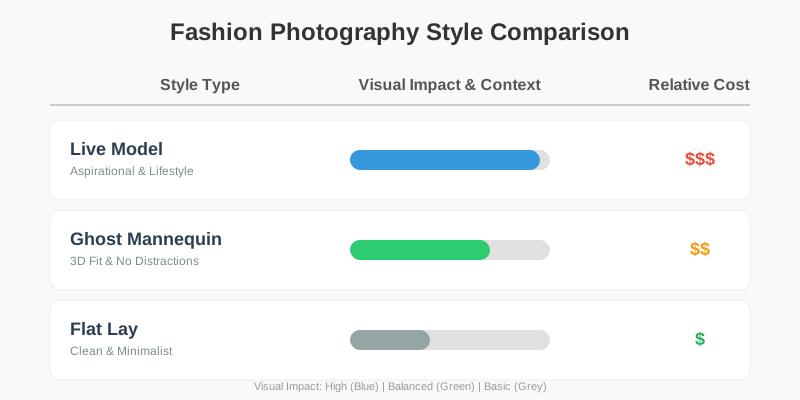
The choice isn't just aesthetic; it’s financial. Conversion rates, return rates, and production costs all hang in the balance. While live models provide context and aspiration, ghost mannequin—also known as "invisible mannequin"—photography offers a 3D view of the garment's fit without the distraction of a human subject.
The Psychology of the "Invisible Mannequin"
Why does a "hollow" piece of clothing often sell better than one worn by a professional model? It comes down to cognitive load and imagination. When a shopper sees a model, they subconsciously judge the model's body type, hair, and style. If the shopper doesn't identify with the model, they may struggle to visualize themselves in the garment.
Ghost mannequin photography removes this barrier. By showing the curve of the waist, the drape of the fabric, and the internal lining of a jacket without a visible body, the garment becomes a "blank canvas." It emphasizes the product's technical construction rather than a curated lifestyle.
Cognitive Ease and Decision Making
In e-commerce, "cognitive ease" is the state in which a person’s brain is processing information without strain. When a customer views a ghost mannequin image, the brain focuses purely on the product's attributes: the texture of the cotton, the symmetry of the stitching, and the volume of the silhouette.
In contrast, on-model photography introduces "social comparison." The customer might think, "That looks great on her, but my shoulders are broader," or "That model is much taller than me." These micro-hesitations are conversion killers. By neutralizing the human element, ghost mannequin photography allows the customer to project their own body into the garment, reducing the psychological friction of the purchase.
Conversion Data: Ghost Mannequin vs. On-Model
Data from Shopify stores across the apparel niche suggests that while on-model images increase "brand trust" and social media engagement, ghost mannequin images often lead to higher "Add to Cart" rates on the product detail page (PDP).
| Metric | Ghost Mannequin | On-Model Images |
|---|---|---|
| Average Conversion Rate | 2.8% - 4.5% | 2.1% - 3.9% |
| Bounce Rate | Lower (Focus on product) | Higher (Focus on aesthetic) |
| Return Rate | Lower (Better fit visualization) | Higher (Misaligned body expectations) |
| Production Speed | High (Consistent setup) | Low (Model/Makeup/Styling) |
Why Returns Decrease with Ghost Mannequin
Returns are the silent profit-killer for Shopify merchants. A significant percentage of returns in fashion are due to "fit issues" or "product not as expected." Ghost mannequin photography provides a more "honest" view of the garment's structure. Because the garment is supported by a mannequin but shown without it, the customer can see the internal structure—how a blazer is lined, how a hood sits, or how a waistband is finished. This transparency builds realistic expectations, leading to more satisfied customers and fewer return labels.
The Cost Factor: Budgeting for Scale
For many Shopify merchants, the decision is made by the bottom line. A live model shoot involves hiring a model, a photographer, a makeup artist, and potentially a studio space. Ghost mannequin photography, while requiring specialized post-production, is significantly more scalable.
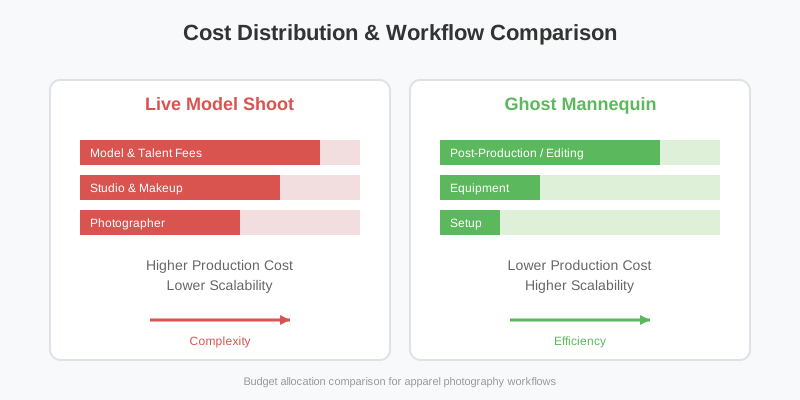
With ghost mannequin photography, the primary cost is the photography itself and the subsequent "compositing"—the process of stitching the front of the garment with the interior neck or hem area that was blocked by the mannequin.
Detailed Breakdown of Hidden Costs
- Model Agency Fees: Often include "usage rights" which expire after 12-24 months. Ghost mannequin images are yours forever.
- Catering and Logistics: On-model shoots require a crew. A ghost mannequin shoot can be a solo operation.
- Reshoot Costs: If a model’s look becomes outdated or they are involved in a controversy, the images may need replacing. Ghost mannequin images are timeless.
- Post-Production: While ghost mannequin requires "neck-joint" editing, modern AI tools like SellerCam have reduced this cost by up to 90% compared to traditional manual retouching.
When to Choose On-Model Photography
Despite the efficiency of ghost mannequin, on-model photography is irreplaceable for certain categories. If you are selling high-end luxury fashion, "vibe" is everything. Customers aren't just buying a silk dress; they are buying the feeling of being at a gala.
On-model images are also essential for:
- Showing Scale: How long is the skirt? How oversized is the hoodie?
- Styling Inspiration: Showing how to pair a blazer with specific trousers.
- Movement: How does the fabric flow when walking?
- Inclusivity: Using models of different sizes and ethnicities to show your brand's values.
The Power of Aspiration
For lifestyle brands (e.g., streetwear, outdoor gear), the model represents the "ideal self" of the customer. A hiker wearing a waterproof jacket in the rain tells a story that a ghost mannequin simply cannot. In these cases, the model provides the emotional hook that leads to the initial click, while the ghost mannequin provides the technical reassurance that leads to the final sale.
The Technical Workflow of Ghost Mannequin Photography
Creating the "invisible" effect is a multi-step process. You cannot simply take one photo. It requires a "ghost" shot and a "fill" shot.
Step 1: Preparation and Styling
Before you even pick up the camera, the garment must be prepared. This involves steaming out every wrinkle. On a ghost mannequin, every fold is visible. Use clips and pins on the back of the mannequin to pull the fabric taut and create a flattering shape.
Step 2: The Ghost Shot
The garment is placed on a modular mannequin with removable chest or arm pieces. You photograph the exterior. The key here is lighting. You want soft, even lighting that defines the edges of the garment without creating harsh shadows that make the compositing difficult later.
Step 3: The Fill Shot (The "Inlay")
You photograph the inside of the garment (like the brand tag and inner lining). This is usually done by turning the garment inside out or hanging it flat on a foam board. This shot provides the "back" of the neck or the inside of the cuffs that were hidden by the mannequin in the first shot.
Step 4: The Composite
An editor (or AI tool like SellerCam) merges these two images. The mannequin is masked out, and the "inlay" shot is warped and placed behind the front shot to create the illusion of a 3D, hollow garment.

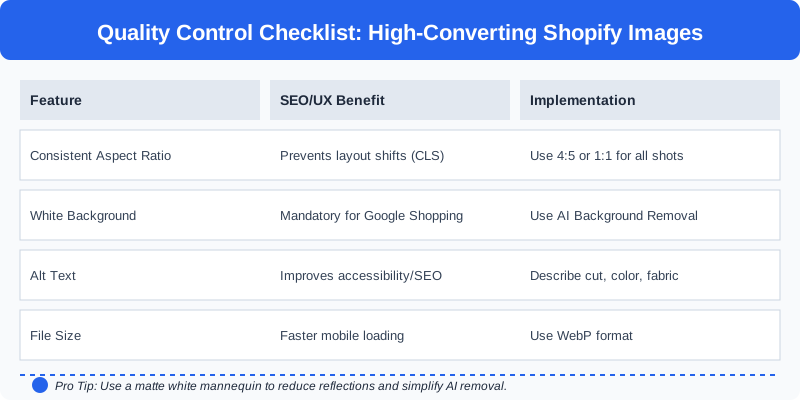
Pro Tip: Use a matte white mannequin to reduce reflections on the fabric. If you're using AI background removal tools like SellerCam, ensure your lighting creates a clear distinction between the mannequin's neck and the garment's collar. Use a "C-stand" to hold the garment open if it's a heavy coat.
Advanced Techniques for Better Results
- Symmetry is Key: Ensure the shoulders are perfectly level. A lopsided mannequin makes the garment look poorly constructed.
- The "V" Shape: For shirts and jackets, aim for a slight "V" taper. This is generally perceived as more "premium" and well-fitted.
- Fabric Texture: Use a side light (rim light) to catch the texture of the fabric. This is especially important for knitwear or linen.
Impact on Shopify SEO and Site Performance
Shopify rewards stores that have fast loading times and high-quality, standardized images. Ghost mannequin photography naturally lends itself to a clean, white-background aesthetic that Google Images and Pinterest favor.
Image Optimization Checklist
| Feature | SEO/UX Benefit | Implementation |
|---|---|---|
| Consistent Aspect Ratio | Prevents layout shifts (CLS) | Use 4:5 or 1:1 for all shots |
| White Background | Mandatory for Google Shopping | Use AI Background Removal |
| Alt Text | Improves accessibility and SEO | Describe the cut, color, and fabric |
| File Size | Faster mobile loading | Use WebP format |
| Zoom Capability | Increases buyer confidence | Minimum 2000px on the longest side |
SEO and Google Shopping
Google Shopping has strict requirements for "Main Images." They must have a plain white background and no watermarks. Ghost mannequin photography is the "gold standard" for Google Shopping. By using this style as your primary image, you ensure your products are eligible for all Google surfaces, including the "Free Listings" tab, which can drive significant organic traffic to your Shopify store.
Case Study: The "Hybrid" Success Story
A mid-sized Shopify boutique specializing in sustainable basics switched from a 100% on-model strategy to a 70% ghost mannequin / 30% on-model hybrid strategy.
The Results:
- Productivity: They were able to list 50 new SKUs per week, up from 15.
- Conversion Rate: Increased from 2.2% to 3.1% on the PDP.
- Return Rate: Dropped by 14% as customers had a clearer view of the actual garment shape.
- Ad Spend: Their Google Shopping ROAS (Return on Ad Spend) improved by 25% because the ghost mannequin thumbnails had a higher click-through rate in search results.
Common FAQ: Ghost Mannequin Photography
Q: Do I need a special mannequin? A: Yes, a "modular" or "ghost" mannequin is best. These have removable pieces (like the neck and chest) specifically designed for this type of photography. However, if you are on a budget, you can use a standard mannequin and use AI tools like SellerCam to "fill in" the gaps.
Q: Can I use a smartphone for these shots? A: Absolutely. Modern smartphones have excellent resolution. The key is the lighting and the post-processing. Using an app like SellerCam allows you to handle the background removal and ghost effect directly on your phone.
Q: How many images should I have per product? A: For a high-converting Shopify page, aim for 5-7 images: 1 Ghost Mannequin (Front), 1 Ghost Mannequin (Back), 2 Close-ups (Fabric/Detail), 1 In-use/Lifestyle (On-Model), and 1 Size Chart/Scale image.
The SellerCam Advantage: Simplifying the Process
Historically, ghost mannequin photography was reserved for brands with massive budgets because the Photoshop work was tedious. You had to manually pen-tool around every sleeve and collar.
SellerCam changes this dynamic. By utilizing AI-powered background removal and specialized "Ghost Mannequin Effect" processing, you can achieve professional results using just your smartphone or a basic DSLR setup.
- Real-time Feedback: Use the SellerCam camera interface to align your shots perfectly. The overlay feature ensures that your front and back shots are perfectly symmetrical.
- Automated Inlays: Let the AI handle the heavy lifting of stitching the interior and exterior shots. What used to take 20 minutes in Photoshop now takes 20 seconds.
- Batch Processing: Update your entire Shopify collection in minutes, not days. SellerCam integrates directly with your store, allowing you to push images to your product pages instantly.
- Cost Efficiency: Eliminate the need for expensive retouching agencies. SellerCam provides studio-quality results at a fraction of the cost.
Conclusion: Finding Your Hybrid Strategy
The most successful Shopify brands in 2026 don't choose just one. They use a Hybrid Strategy.
- Main Image (Thumbnail): Ghost Mannequin. It provides the cleanest look for the collection page and ensures the product is the hero. It is also the most effective for search engine results and ad platforms.
- Secondary Images: Close-ups of fabric and the "Inlay" shot. These build trust by showing the quality of the materials and the internal construction.
- Lifestyle Image: One or two on-model shots at the end of the gallery to provide context, emotional connection, and styling ideas.
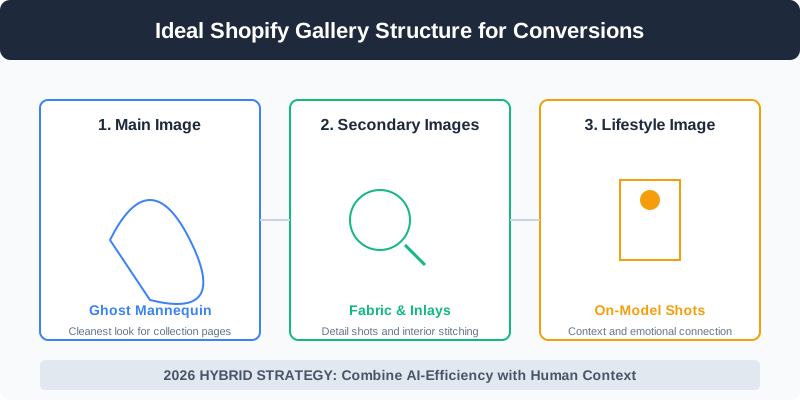
By focusing on ghost mannequin photography for your primary product shots, you reduce the "noise" in your customer's shopping journey, leading to fewer returns and higher confidence. In the world of e-commerce, clarity is the ultimate currency.
Ready to transform your Shopify store's imagery? Don't let expensive studio fees or complex editing workflows hold your brand back. Try SellerCam's AI camera today and create professional ghost mannequin effects in seconds. Whether you are a solo founder or a growing team, our tools are designed to help you scale your visual content without scaling your costs.
Author

Categories
More Posts
The Ultimate Guide to Choosing a Product Image Editing Service for High-Volume E-commerce
Discover how to choose the right product image editing service, compare AI vs. manual retouching, and optimize your workflow for Amazon, Etsy, and Shopify.
The Ultimate Guide to Ghost Mannequin Clothing Photography for E-commerce
Master ghost mannequin photography to create professional 3D hollow-man effects for your apparel brand. Learn setup, shooting, and AI editing techniques.
Google Slides: How to Remove Background from Image for Professional Presentations
Master background removal in Google Slides with our comprehensive guide. Learn built-in methods, Gemini AI features, and professional alternatives for high-quality product slides.
Newsletter
Join the community
Subscribe to our newsletter for the latest news and updates