The Ultimate Guide to Amazon Photo Editing Software: High-Converting Images Without the Complexity
Discover the best Amazon photo editing software and AI tools to meet strict image requirements, boost click-through rates, and scale your ecommerce business efficiently.
If you are selling on Amazon, you already know that your main product image is the single most important factor in your Click-Through Rate (CTR). You can have the best PPC strategy and the most optimized keywords, but if your hero image looks amateur, shoppers will simply scroll past.
Navigating the world of Amazon photo editing software can be overwhelming. On one hand, you have professional-grade giants like Adobe Photoshop that require months of training. On the other, you have basic mobile apps that often fail to meet Amazon's rigid technical standards. Today, the landscape is shifting toward AI-powered solutions that bridge the gap—delivering studio-quality results in seconds.
Why Standard Photo Editors Often Fail Amazon Sellers
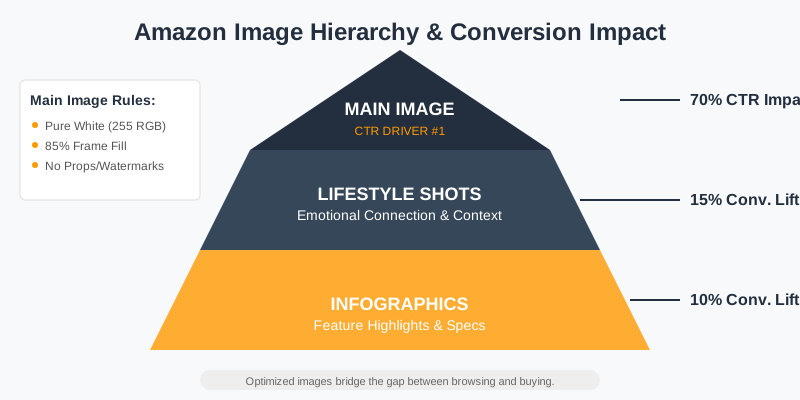
Most generic photo editing software is designed for creative expression, not for the high-volume, precision-oriented needs of an Amazon business. Amazon has a very specific set of "Main Image" requirements that are non-negotiable. If your software doesn't help you automate these, you are wasting hours on manual labor.
Amazon’s core requirements include:
- A pure white background (RGB 255, 255, 255): Not "off-white" or light gray. Amazon's algorithms check for this specifically.
- The product must fill 85% or more of the image frame: This ensures maximum visibility on mobile devices.
- No watermarks, borders, or promotional text on the main image: These lead to immediate listing suppression.
- High resolution (at least 1000px on the longest side): This enables the hover-to-zoom feature which is proven to increase conversion rates.
| Feature | Generic Photo Editor | Professional Retouching | AI-Powered Amazon Tool |
|---|---|---|---|
| Background Removal | Manual/Magic Wand (Inaccurate) | Pen Tool (Slow) | AI Neural Networks (Instant) |
| White Balance | Manual Sliders | Color Grading Professional | Auto-Correction for Ecommerce |
| Batch Processing | Limited | Script-based | Built-in Cloud Processing |
| Platform Compliance | User Responsibility | High Quality | Auto-formatted for Amazon |
Comparing Top Amazon Photo Editing Software Categories
To choose the right tool, you first need to identify which category of user you fall into. Are you a high-volume wholesaler, a private label brand owner, or a casual side-hustler?
1. Professional Desktop Suites (Photoshop & Lightroom)
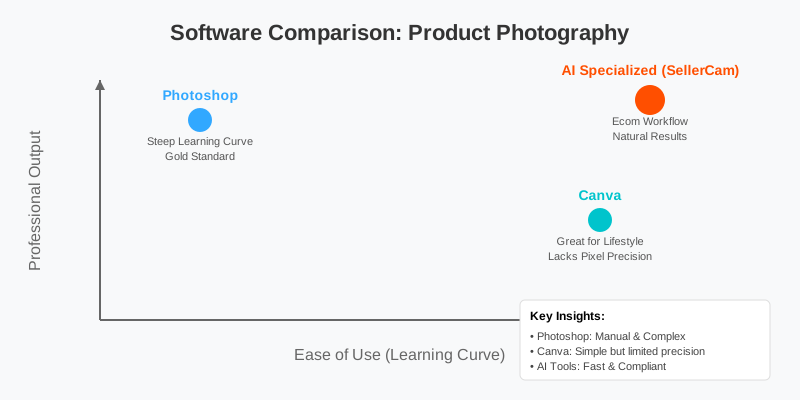
These remain the gold standard for high-end retouching. If you need to fix a complex reflection on a metallic surface or combine multiple exposures for a "perfect" look, Photoshop is unbeatable. However, the learning curve is steep, and the monthly subscription adds up.
Best for: Professional photographers and large brands with dedicated creative teams. Pros: Infinite control, industry-standard tools. Cons: High cost, steep learning curve, time-consuming.
2. Browser-Based Design Tools (Canva & Pixlr)
Canva is excellent for creating secondary images (infographics and lifestyle shots). However, it often struggles with precision background removal for complex items like clothing or jewelry. It isn't built for the "Main Image" workflow where pixel-perfect white backgrounds are required.
Best for: Creating infographics and social media assets. Pros: Easy to use, great templates. Cons: Lacks professional retouching depth, background removal is often "fuzzy."
3. AI-First Ecommerce Specialized Tools (SellerCam)
This is where the industry is heading. Tools like SellerCam are built specifically for the Amazon workflow. They don't just "edit" photos; they transform raw snapshots into compliant listings. By using AI trained specifically on product photography, these tools can identify the difference between a product and its shadow, ensuring the "Ghost Mannequin" effect or "White Background" looks natural rather than "cut out."
Best for: Amazon sellers looking to scale quickly without hiring an agency. Pros: Built-in compliance, extreme speed, mobile-to-web workflow. Cons: Less manual "artistic" control than Photoshop.
The Technical Workflow: From Raw Capture to Amazon Ready
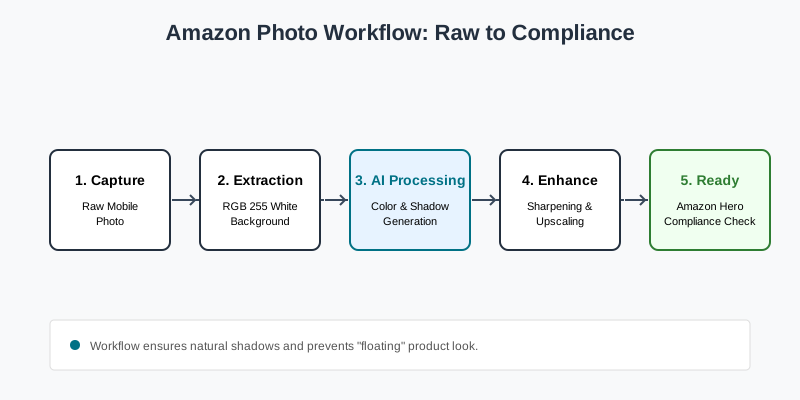
The secret to great Amazon photos isn't just the software; it's the workflow. Many sellers make the mistake of trying to "fix it in post" when they could have saved time with better capture.
Step 1: Capture with Post-Processing in Mind
Even if you are using a smartphone, lighting is key. Use soft, diffused light to avoid harsh highlights that are difficult for software to "read." If your software has an integrated camera app (like SellerCam), use it. These apps often use AR to help you center the product perfectly, saving time in the cropping phase.
Step 2: Background Extraction
Removing the gray or cluttered background and replacing it with pure RGB 255 white. This is the most critical step for the "Main Image." Modern AI tools use edge-detection algorithms that can handle difficult textures like hair, fur, or semi-transparent plastics.
Step 3: Color Correction & White Balance
Ensuring the product looks exactly like it does in real life to reduce return rates. If your product is "Navy Blue" but looks "Black" in the photo, you will face a wave of "Product not as described" returns. Good software allows you to calibrate colors with a single click.
Step 4: Shadow Generation
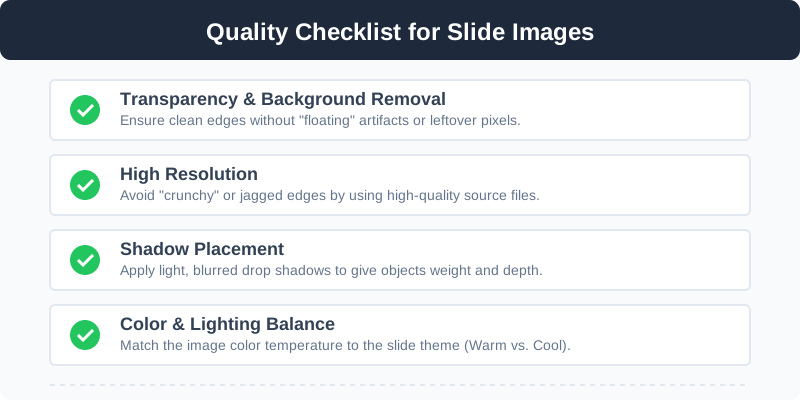
Adding a subtle drop shadow or reflection so the product doesn't look like it's "floating" in a void. A "floating" product looks fake and untrustworthy. A realistic ground shadow grounds the product in reality.
Step 5: Sharpening and Upscaling
Enhancing details so the textures are visible when the customer zooms in. If you are starting with a lower-resolution mobile photo, AI upscaling can add missing pixels to ensure the image stays crisp at 2000px wide.
Deep Dive: Main Image vs. Secondary Images
Your software needs to handle two very different types of editing.
The Main Image (The "Hero")
This is clinical. It needs to be sharp, bright, and perfectly centered. The goal here is clarity. AI background removal is your best friend here. Instead of spending 15 minutes with a lasso tool in Photoshop, an AI tool can detect the edges of a fuzzy sweater or a transparent glass bottle in under 3 seconds.
Secondary Images (The "Storytellers")
For your 2nd through 7th images, you need lifestyle context and infographics. This is where you might move from a tool like SellerCam to a layout tool. You want to show the product in use.
| Image Type | Primary Goal | Software Requirement |
|---|---|---|
| Main Image | Compliance & CTR | AI Background Removal, White Balance |
| Lifestyle | Emotional Connection | AI Scene Generation, Smart Filters |
| Infographic | Feature Education | Text Overlay, Icon Libraries, High Resolution |
| Dimension | Size Clarification | Measurement Lines, Scale Comparison |
The Rise of AI Scene Generation
One of the most expensive parts of Amazon photography is the lifestyle shoot. Hiring models, renting a studio, and setting up lighting can cost thousands. Modern Amazon photo editing software is introducing "AI Scene Generation."
How AI Scene Gen Works
This technology allows you to take a photo of your product on a kitchen table and, through AI, place it on a luxury marble countertop with soft morning sunlight. For Amazon sellers, this is a game-changer for "Lifestyle" images.
Benefits of AI Lifestyle Images:
- Cost Reduction: No need for expensive props or locations.
- Rapid A/B Testing: You can generate a "Modern Kitchen" version and a "Rustic Kitchen" version of your product image and see which one gets more clicks in your Amazon Experiments dashboard.
- Consistency: Ensure all your products look like they were shot in the same environment, building brand cohesion.
Advanced Tips for Pro-Level Results
To truly stand out, you need to go beyond basic editing. Here are professional techniques you can apply using specialized Amazon photo editing software:
1. Focus Stacking
If you are selling small items like jewelry or electronics, a single photo might have a shallow depth of field (where the back of the product is blurry). Focus stacking involves taking multiple photos at different focus points and merging them. Professional software does this automatically to ensure the entire product is tack-sharp.
2. Ghost Mannequin Effect
For apparel sellers, showing the shape of a garment without a distracting mannequin is essential. This usually requires two photos—one of the garment on a mannequin and one of the inside tag. Advanced AI tools can now "stitch" these together to create a hollow, 3D look that looks professional and clean.
3. Texture Enhancement
Amazon's zoom feature is a powerful sales tool. Use "High-Pass" filters or AI detail enhancers to make the fabric weave or wood grain pop. When a customer can "feel" the texture through their screen, their confidence in the purchase increases.
Common Mistakes to Avoid in Amazon Photo Editing
Even with the best software, sellers often fall into these traps:
- Over-Sharpening: This makes the product look "crunchy" and fake. It creates halos around the edges that scream "cheap."
- Inconsistent Lighting: If your main image has light coming from the left, but your secondary images have light from the right, it creates a subconscious "uncanny valley" effect for the buyer.
- Poor Aspect Ratio: Amazon prefers square images (1:1). If you upload a vertical 4:5 image, you are leaving valuable real estate on the screen empty.
- Ignoring Mobile: Over 50% of Amazon shoppers are on mobile. If your text on infographics is too small, it's useless. Always preview your edits on a mobile-sized window.
- Using Stock Photos Poorly: If you use AI to place your product in a scene, ensure the shadows match. If the product has no shadow but the table does, it looks like a bad "copy-paste" job.
Frequently Asked Questions (FAQ)
What is the best free Amazon photo editing software?
While tools like GIMP or Pixlr are free, they lack the automation needed for Amazon. For a free start, Canva is great for infographics, but for main images, specialized AI tools often offer a "free trial" or "pay-per-image" model that is much more efficient.
Does Amazon allow AI-generated images?
Yes, as long as the product itself is a real representation of what the customer will receive. Amazon encourages high-quality lifestyle imagery, and AI scene generation is a valid way to achieve that. However, the Main Image must be a real photo of the actual product.
How many images should I have on my listing?
You should aim for at least 6 images and 1 video. This typically includes 1 Main Image, 2-3 Infographics (highlighting features), and 2 Lifestyle images.
What resolution is best for Amazon?
While 1000px is the minimum for zoom, 2000px x 2000px is the "sweet spot." It provides enough detail for deep zooming without making the file size so large that it loads slowly on mobile connections.
Why SellerCam is the Logical Choice for Amazon Sellers
While you could buy a subscription to three different tools, SellerCam simplifies the stack. It is designed to be a "Camera-to-Cloud" solution.
By using the SellerCam AI camera, the software understands the depth and lighting of the shot the moment you take it. This makes the background removal significantly more accurate than trying to process a photo taken with a standard camera app later. It handles the batch processing of white backgrounds, ensures your resolution meets the 1000px+ zoom requirement, and even helps generate the creative lifestyle backgrounds that usually require a professional photographer.
Key SellerCam Advantages:
- Instant Compliance: Automatically checks if your image meets Amazon's 85% frame-fill and RGB 255 requirements.
- Mobile Workflow: Take the photo on your phone, edit in the cloud, and upload to Seller Central without ever touching a desktop.
- AI Shadow Logic: Generates realistic shadows based on the actual shape of your product, not just a generic oval.
Final Thoughts: Investing in Your Visual Assets
The "Amazon photo editing software" you choose is an investment in your conversion rate. If a $30/month tool increases your conversion rate from 5% to 7%, the ROI is astronomical. In a marketplace where thousands of sellers are competing for the same "Buy Box," your visual presentation is your primary competitive advantage.
Don't get bogged down in professional tools that take years to master unless you plan on becoming a full-time editor. For most sellers, the goal is to get the product listed and selling as fast as possible with the highest quality possible. AI-driven specialized tools are the fastest path to that goal.

Ready to see the difference professional AI editing can make for your brand? Stop struggling with complex sliders and manual cutouts.
Ready to upgrade your product photos? Try SellerCam's AI camera →
Author

Categories
More Posts
Ghost Mannequin vs. On-Model Images: Which Drives Higher Shopify Conversions?
Discover the impact of ghost mannequin photography versus live model images on Shopify conversion rates. Learn which style fits your brand, cost implications, and how AI is changing the game.

The Ultimate Guide to Removing Backgrounds from Logo Images for eCommerce
Learn how to remove background from logo images effectively. We cover AI tools, manual methods, and platform-specific requirements for transparent logos.

What Can I Use to Remove Background from Image? The Ultimate Guide for E-commerce
Discover the best tools and techniques to remove backgrounds from images. From AI-powered automation to manual precision, find the perfect solution for your product photography.
Newsletter
Join the community
Subscribe to our newsletter for the latest news and updates