Ghost Mannequin Photography Near Me: Why Local Studios Are Being Replaced by AI
Searching for ghost mannequin photography near you? Discover why e-commerce brands are shifting from expensive local studios to AI-powered invisible mannequin solutions.
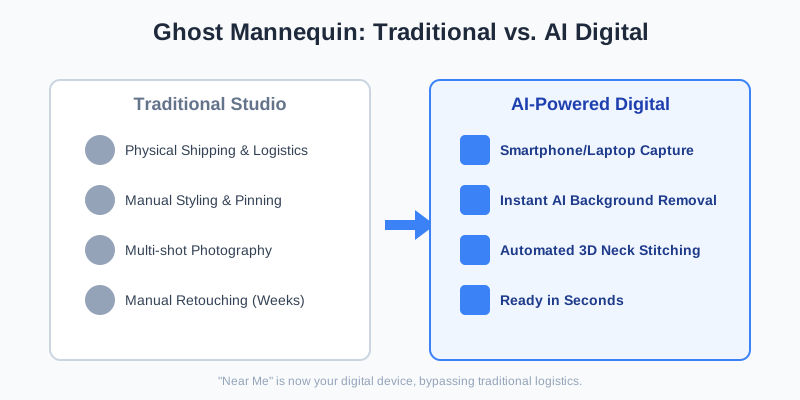
When you search for "ghost mannequin photography near me," you are likely looking for a way to make your apparel look professional, 3D, and wearable without the distraction of a plastic doll or a high-priced model. Traditionally, this meant packing up your inventory, shipping it to a local studio in cities like Los Angeles or New York, and waiting weeks for the post-production team to stitch images together.
But the photography landscape has shifted. The "near me" isn't a physical address anymore—it's your smartphone or your laptop. Whether you are a small boutique owner or a scaling Shopify brand, the invisible mannequin effect is now achievable in seconds using AI, bypassing the logistical nightmare of traditional studio photography.
The Reality of Local Ghost Mannequin Studios
Local studios offer a high-touch service, but they come with significant overhead. A typical ghost mannequin shoot involves a photographer, a stylist to pin the clothes, and a specialized retoucher who manually merges the "on-mannequin" shot with the "inner-neck" shot.
When searching for a local provider, many brands overlook the "hidden friction" of the process. You aren't just paying for the shutter click; you are paying for the studio's rent, the equipment depreciation, and the labor-intensive manual editing. Furthermore, the "near me" convenience often disappears when you realize you still have to coordinate courier services or spend hours in traffic delivering samples.
The True Cost of Local Production
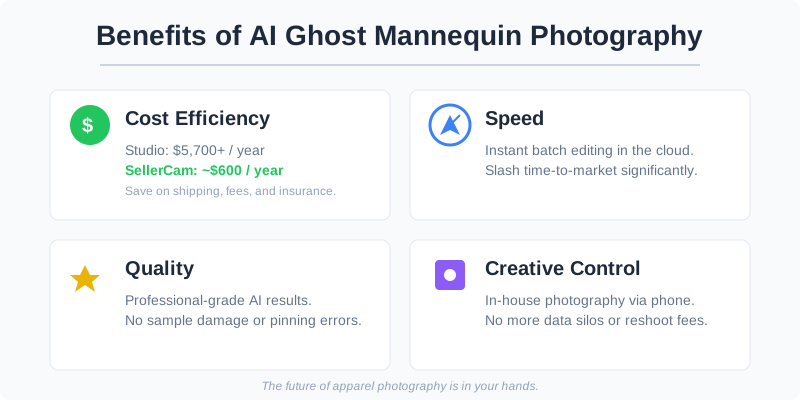
If you are looking for a studio nearby, you need to consider the total cost of ownership. It isn't just the price per image; it is the shipping, the insurance, and the "time-to-market" delay. In e-commerce, being late to a season because your photos are stuck in a studio's queue can cost thousands in lost sales.
Most local studios charge a "setup fee" ranging from $150 to $500 before a single photo is even taken. Then, they charge per item, often with a minimum order quantity. For a brand launching a small capsule collection of 10 items, the effective cost per garment can easily exceed $100.
Cost and Time Comparison: Local Studio vs. AI
| Feature | Local Professional Studio | SellerCam AI Solution |
|---|---|---|
| Price per Image | $25 - $75 | $0.10 - $0.50 |
| Turnaround Time | 3 - 10 Business Days | Instant (Seconds) |
| Logistics | Shipping & Handling Required | In-house Shooting |
| Scalability | Limited by Studio Schedule | Unlimited Batch Processing |
| Reshoots | Expensive & Time Consuming | Free & Immediate |
| Minimum Order | Often 10-20 items | No Minimum |
Why the "Invisible Mannequin" Effect Matters
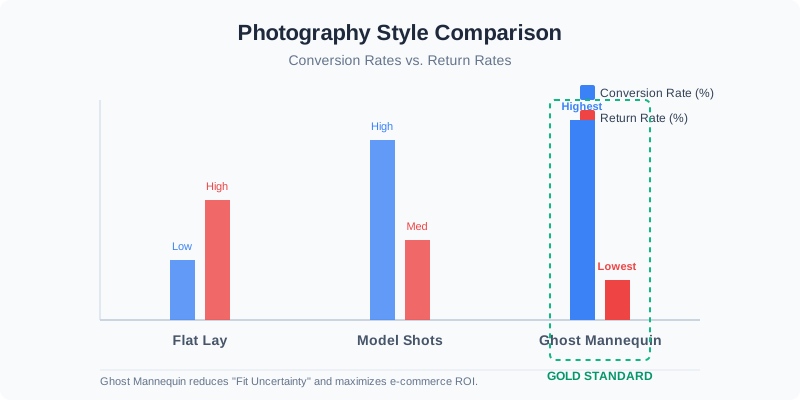
The ghost mannequin effect (also known as hollow man photography) is the gold standard for apparel. It provides a 3D shape that helps customers visualize the fit while keeping the focus entirely on the garment's texture, cut, and color. Unlike flat lays, which can look lifeless, or model shots, which can be expensive and carry "brand fit" risks, ghost mannequin images are clean, consistent, and platform-compliant.
Psychology of the "Hollow Man"
Why does this work so well? It’s about cognitive load. When a customer sees a model, they subconsciously judge the model's hair, skin tone, and body type. This can create a barrier if the customer doesn't identify with the model. The ghost mannequin removes these variables, allowing the customer to mentally "step into" the garment.
When you use this technique, you are solving the "fit uncertainty" that leads to high return rates in fashion e-commerce. Data shows that 3D-effect images reduce return rates by up to 22% compared to flat-lay photography.
How to Achieve the Effect Without a Local Studio
If you decide to skip the "near me" search and handle photography in-house, the process is surprisingly simple with the right tools. You no longer need to be a Photoshop wizard to merge neck joints.
The Traditional Manual Workflow
To understand why AI is a game-changer, you must understand the labor it replaces:
- The Body Shot: Dress the mannequin and take the photo.
- The Inlay Shot: Take a separate photo of the inside back of the garment (like the brand tag area) by pinning it to a foam board.
- The Masking: Use Photoshop’s Pen Tool to meticulously cut out the mannequin from the body shot.
- The Compositing: Layer the inlay shot behind the body shot, matching the perspective and lighting perfectly to create the "hollow" look.
- Shadow Creation: Manually paint in drop shadows to give the garment depth.
The AI-Enhanced Workflow
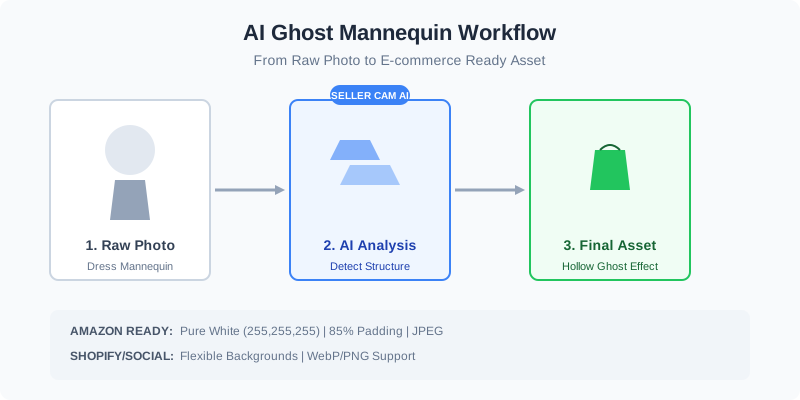
With SellerCam, the AI recognizes the garment's structure and the mannequin's presence. It automatically removes the hardware while preserving the natural drape of the fabric. It uses generative filling to reconstruct the areas where the mannequin was visible, such as the neck, armholes, and hemline.
| Platform Requirement | Amazon Fashion | Shopify / Instagram |
|---|---|---|
| Background Color | Pure White (RGB 255, 255, 255) | Flexible (Lifestyle or Solid) |
| Padding | 85% of image frame | Variable |
| File Format | JPEG / TIFF | WebP / PNG / JPEG |
| Resolution | Min 1000px on longest side | Min 1024px |
Deep Dive: Setting Up Your In-House "Studio"
You don't need a $5,000 DSLR or a studio in downtown LA to get these results. By using your smartphone and SellerCam's AI-guided camera, the software handles the lighting normalization and the background removal simultaneously. Here is how you set up a professional space in a 10x10 corner:
1. The Mannequin Selection
You don't need an expensive modular "ghost" mannequin with removable pieces. A standard white or grey matte mannequin works perfectly for AI. Avoid glossy finishes, as they create reflections that can confuse the AI's edge detection.
2. Lighting for Success
The goal is "flat" lighting. You want to minimize deep shadows within the garment's folds.
- Key Light: Positioned at 45 degrees to the left.
- Fill Light: Positioned at 45 degrees to the right.
- Backlight: (Optional) Pointed at the wall behind the mannequin to create separation.
3. Garment Preparation
This is the most critical step. AI can fix many things, but it cannot fix a poorly fitted garment.
- Steam Everything: Wrinkles catch light and look unprofessional.
- Symmetry: Ensure the shoulder seams align perfectly on the mannequin.
- The "Clip" Technique: Use binder clips on the back of the garment to pull the fabric taut across the chest. This creates the "hero" look seen in high-end catalogs.
Real-World Results with SellerCam
The difference is clear: the "Before" shows a cluttered home environment with a standard mannequin, while the "After" is a professional, high-conversion asset ready for Amazon or Etsy.
Case Study: A Boutique’s Transition
Consider "Urban Thread," a mid-sized boutique. They previously spent $2,000 per month on a local photographer. By switching to an in-house AI workflow:
- Monthly Savings: $1,850.
- Speed: They now list new arrivals on Tuesday that arrived at the warehouse on Monday. Previously, this took 14 days.
- Consistency: Every photo has the exact same lighting and crop, making their Shopify collection page look significantly more premium.
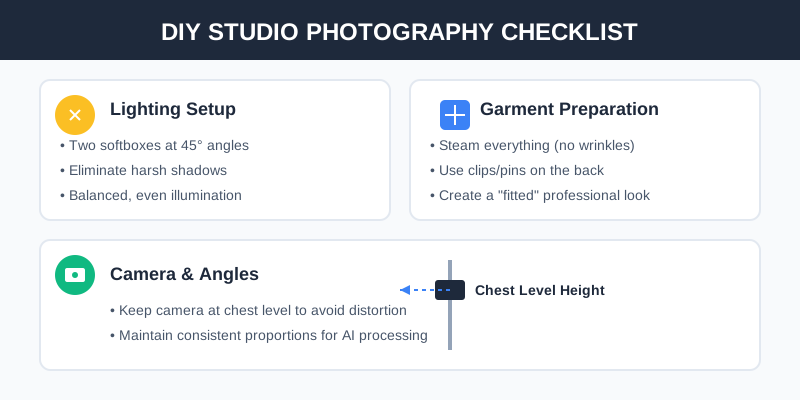
Essential Checklist for DIY Ghost Mannequin Photography
If you are moving away from local studios to an in-house setup, follow this checklist to ensure your AI has the best "raw material" to work with:
- Lighting: Use two softboxes at 45-degree angles to eliminate harsh shadows.
- Steaming: AI can remove backgrounds, but it can't (yet) perfectly iron your clothes. Steam everything.
- Clips and Pins: Use small clips on the back of the mannequin to create a "fitted" look.
- Camera Height: Keep the camera at chest level to avoid distorting the garment's proportions.
- Distance: Stand at least 6-8 feet away and zoom in slightly to avoid "fisheye" distortion of the clothing.
- Inner Details: For hoodies or open jackets, ensure the inner lining is visible and clean.
The Hidden Costs of "Near Me" Services
Many sellers choose local photographers because they believe it's "easier." However, the hidden costs often outweigh the convenience:
- Sample Loss: Items can be damaged during shipping or while being pinned at the studio.
- Lack of Creative Control: If the stylist pins the shirt in a way you don't like, you often can't change it without paying for a reshoot.
- Data Silos: Your images live on the photographer's hard drive. With a tool like SellerCam, your entire catalog is in the cloud, ready for batch editing at any time.
- Opportunity Cost: The 10 days your product spends in a box traveling to a studio is 10 days of zero revenue. For trending items, this is a death sentence.
Annual Cost Breakdown
| Cost Category | Local Studio (Annual) | SellerCam AI (Annual) |
|---|---|---|
| Service Fees | $5,000 - $15,000 | $300 - $600 |
| Shipping/Courier | $500 - $1,200 | $0 |
| Insurance | $200 - $500 | $0 |
| Reshoot Fees | $400 - $800 | $0 |
| Total Estimated | $6,100 - $17,500 | $300 - $600 |
Advanced Tips for Pro-Level AI Results
To truly compete with high-end brands like Nike or Zara, you can use these advanced techniques with your AI workflow:
1. Handling Complex Fabrics
Sheer fabrics, lace, and mesh are traditionally a nightmare for ghost mannequin photography. When shooting these, place a piece of cardstock inside the garment that matches the background color. This helps the AI distinguish between the "holes" in the fabric and the mannequin.
2. Creating Consistent Shadows
While the AI removes the background, adding a subtle "ground shadow" or "drop shadow" in the post-processing settings can make the garment feel grounded. Without a shadow, the clothes can look like they are floating in a void, which can feel "uncanny" to some shoppers.
3. The "Neck Joint" Perfection
For high-collared items like polos or coats, take one photo with the collar up and one with the collar down. SellerCam’s AI can use the data from both to create a perfect 360-degree interior view of the neck area.
Frequently Asked Questions (FAQ)
Is AI photography allowed on Amazon?
Yes. Amazon requires a pure white background and a clear representation of the product. AI-generated ghost mannequin images meet and often exceed these requirements because they eliminate the "noise" of a physical studio.
Do I need a special "Ghost Mannequin"?
No. While "modular" mannequins (with removable neck and arm pieces) make manual editing easier, AI can handle standard mannequins just as effectively. This saves you $300-$600 on equipment costs.
Can I use my iPhone for this?
Absolutely. Modern smartphone cameras have more than enough resolution (12MP+) for e-commerce. The key is the lighting and the AI processing, not the camera body.
How long does it take to learn?
Most users are able to produce professional-grade images within 15 minutes of downloading the app. The AI does the heavy lifting, so you don't need to learn complex photo editing software.
Conclusion: The Future of Apparel Photography
The search for "ghost mannequin photography near me" is becoming a relic of the past. As AI technology matures, the distance between your product and a professional-grade image has shrunk to the distance between your hand and your phone.
By bringing your photography in-house with SellerCam, you regain control over your brand's visual identity, slash your time-to-market, and save thousands of dollars that can be better spent on ad spend or product development. The "near me" solution is now in your pocket.
Pro Tip: When shooting for the ghost mannequin effect, always take a "back-up" shot of the garment inside-out. While SellerCam's AI is incredibly powerful at reconstructing necklines, having that extra data ensures a perfect 3D render every time, especially for garments with complex labels or contrasting inner linings.
Ready to stop searching for studios and start selling? Try SellerCam's AI camera today and transform your smartphone into a professional photography suite. Stay ahead of the competition by embracing the AI revolution in fashion e-commerce.
Author

Categories
More Posts
The Ultimate Guide to Removing Backgrounds from Logo Images for eCommerce
Learn how to remove background from logo images effectively. We cover AI tools, manual methods, and platform-specific requirements for transparent logos.
The Ultimate Guide to Best Software to Remove Background from Image for E-commerce
Discover the best software to remove background from images. Compare AI tools, professional software, and batch processors to streamline your e-commerce workflow.
Mastering Background Removal for Product Images: The Ultimate Seller's Guide
Learn how to remove backgrounds from product images efficiently. Discover pro techniques using AI, manual tools, and platform-specific requirements to boost sales.
Newsletter
Join the community
Subscribe to our newsletter for the latest news and updates