The Ultimate Guide to Choosing a Product Image Editing Service for High-Volume E-commerce
Discover how to choose the right product image editing service, compare AI vs. manual retouching, and optimize your workflow for Amazon, Etsy, and Shopify.
In the competitive landscape of e-commerce, your product image is your storefront, your salesperson, and your brand ambassador all rolled into one. When a customer lands on your listing, they don't read the bullet points first—they scan the visuals. If those visuals are lackluster, poorly lit, or cluttered, you’ve lost the sale before the page even fully loads.
This is where a professional product image editing service becomes indispensable. Whether you are a solo entrepreneur on Etsy or a category leader on Amazon, the leap from "amateur photo" to "high-converting asset" requires specialized post-processing. But the market is shifting. We are moving away from traditional, slow-turnaround manual retouching toward agile, AI-driven solutions. Navigating this shift is the difference between scaling your business and getting bogged down in administrative overhead.
The Evolution of Product Image Post-Processing
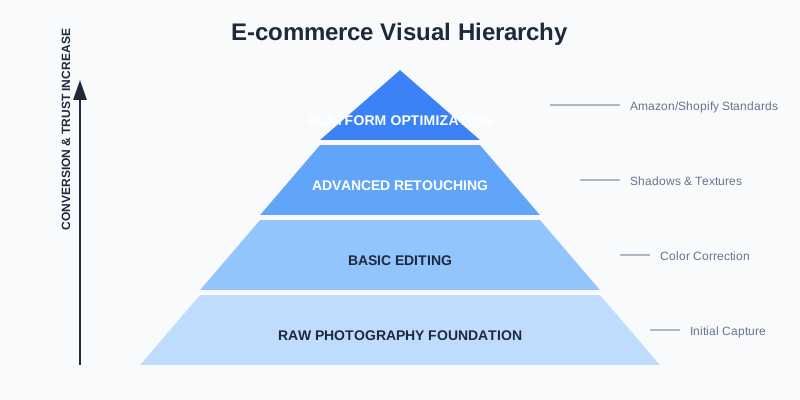
For years, the standard workflow for high-volume sellers involved shipping products to a studio, waiting for the shoot, and then waiting another 48 to 72 hours for a manual editing team in a different time zone to clip paths and adjust levels. This model is increasingly brittle in an era of "fast commerce."
Today, the definition of a "service" has expanded. It's no longer just a group of people with Photoshop; it’s an ecosystem of AI-powered tools and specialized agencies. The goal remains the same: clean backgrounds, accurate colors, and realistic shadows. However, the speed at which we achieve this has changed from days to seconds.
Why Quality Editing Isn't Optional
Statistics consistently show that 75% of online shoppers rely on product photos when deciding on a potential purchase. Furthermore, high-quality images decrease return rates because the customer has a more accurate expectation of what they are receiving.
| Metric | Basic Photos | Professional Edited Photos | Impact |
|---|---|---|---|
| Click-Through Rate (CTR) | 1.2% | 3.8% | +216% Increase |
| Conversion Rate (CVR) | 2.5% | 5.1% | +104% Increase |
| Return Rate | 12% | 7% | -41% Decrease |
Manual vs. AI-Powered Editing Services
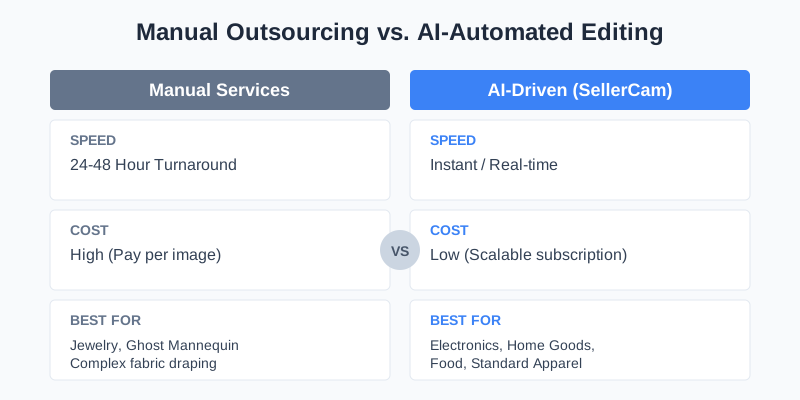
When choosing a service, you must decide between human-led retouching and AI-automated platforms. Each has its place depending on the complexity of your product.
Traditional Manual Services
These are best for highly reflective surfaces (like jewelry) or complex "ghost mannequin" effects for high-end fashion where fabric draping requires a human eye. You pay per image, and the primary cost is time. Manual editors excel at:
- Complex Clipping Paths: Objects with hundreds of holes or intricate patterns.
- High-End Jewelry: Managing reflections on diamonds and polished gold.
- Creative Compositing: Merging multiple exposures for a single "hero" shot.
AI-Driven Services (The SellerCam Approach)
For 90% of e-commerce needs—including electronics, home goods, packaged food, and standard apparel—AI has surpassed human speed while matching professional quality. Tools like SellerCam allow you to snap a photo and instantly apply background removal, color correction, and shadow generation.
Critical Features to Look for in an Editing Service
Not all services are created equal. If you are evaluating a provider, use this checklist to ensure they can handle the rigors of modern e-commerce.
1. Advanced Background Removal
It’s not just about making it white. It’s about handling "difficult" edges—hair, fur, transparent glass, and intricate lace. A top-tier service uses neural networks to understand the object's geometry, ensuring the crop looks natural and not like a "sticker" placed on a page.
2. Consistency Across Batches
Your storefront looks unprofessional if one product has a drop shadow and the next one has a reflection. A professional service should offer "presets" or "style profiles" that ensure every image uploaded matches your brand's specific visual language. Consistency builds trust; trust builds sales.
3. Platform-Specific Optimization
Amazon has different requirements than Instagram. Your service should automatically output the correct file formats (WebP, PNG, JPG), aspect ratios, and padding requirements for your specific sales channel.
| Feature | Low-End Service | Professional Service (e.g., SellerCam) |
|---|---|---|
| Edge Detection | Jagged/Blurry | Sub-pixel Precision |
| Shadows | Flat/Artificial | Natural Ambient/Drop Shadows |
| Batch Processing | Manual/One-by-one | Instant Bulk Upload |
| Mobile Access | None (Desktop only) | Camera-to-Cloud Integration |
Deep Dive: Advanced Editing Techniques
To truly stand out, you need to understand the technical nuances that separate a "good" image from a "great" one.
Color Correction and Grading
In e-commerce, color accuracy is paramount. If a customer orders a "Navy Blue" shirt and receives something that looks "Royal Blue," you will face a high return rate. A professional editing service uses color profiles to ensure that what the camera captured is translated accurately to the digital screen. This involves:
- White Balance Adjustment: Removing yellow or blue tints caused by artificial lighting.
- Saturation Control: Making colors pop without looking "neon" or unrealistic.
- Vibrance Tuning: Enhancing the mid-tones to give the product a lifelike feel.
Texture Enhancement
Modern AI services can now detect textures. Whether it's the grain of a leather bag or the knit of a sweater, professional editing ensures these details aren't lost during background removal. High-resolution sharpening applied specifically to the product (and not the background) creates a "tactile" experience for the shopper.
Shadow Engineering
Shadows provide the "grounding" for your product. Without them, products look like they are floating in space.
- Drop Shadows: Give the impression the product is slightly above the surface.
- Reflective Shadows: Create a premium, high-end look often seen in tech and beauty products.
- Cast Shadows: Mimic natural sunlight, perfect for lifestyle-oriented listings.
The Workflow: From Raw Capture to Final Listing
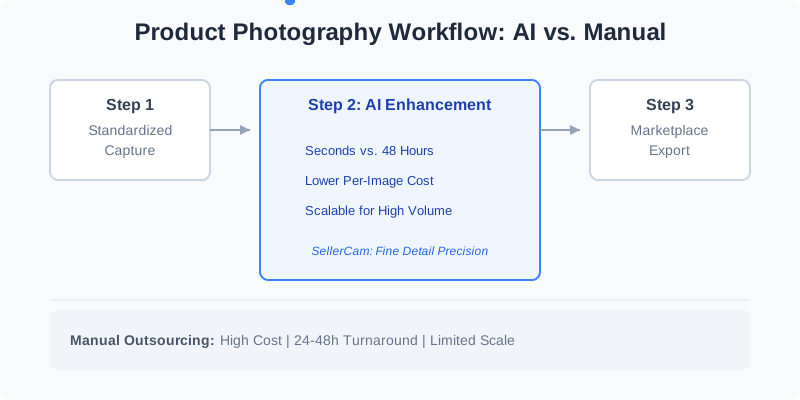
Efficiency is the silent killer of e-commerce margins. If your workflow involves five different apps, you're losing money. A modern product image editing service should streamline the process into a linear path.
Step 1: Lighting and Capture
Even the best AI can't fix a completely blurry or pitch-black photo. However, with SellerCam's guided camera interface, you can ensure the framing is correct from the start. Use a three-point lighting setup if possible, or simply utilize natural light from a large window.
Step 2: Automated Enhancement
Once the image is captured, the AI goes to work. It identifies the subject, removes the background, and balances the exposure. This is where the "heavy lifting" happens. For high-volume sellers, this step must be instantaneous.
Step 3: Creative Context (The AI Stage)
For lifestyle images, you might want to place your product in a kitchen or an office. Modern services offer "AI Stage" features that generate realistic environments without the need for a physical set. This allows you to create "contextual" images that help customers visualize the product in their lives.
Platform Requirements: A Quick Reference
Every marketplace has its own "Bible" of image standards. Failing to adhere to these can result in suppressed listings or shadow-banning.
| Platform | Primary Image Requirement | File Format | Recommended Resolution |
|---|---|---|---|
| Amazon | Pure White (RGB 255) | JPG / TIFF | 2000 x 2000 px |
| Shopify | Flexible (Brand Consistent) | WebP / PNG | 2048 x 2048 px |
| Etsy | Lifestyle / Contextual | JPG / PNG | 2000 px (Short side) |
| eBay | Neutral / Off-white | JPG | 1600 x 1600 px |
| Lifestyle / 4:5 Ratio | JPG | 1080 x 1350 px |
Case Study: Scaling a Home Decor Brand
Consider "LuxeHome," a mid-sized brand that recently expanded from 10 to 200 SKUs. Using a manual editing service, their "Time to Market" was 14 days per product. By switching to an AI-driven editing service, they reduced this to 24 hours.
- Old Cost: $5 per image x 7 images per SKU = $35 per product.
- New Cost: Included in a monthly subscription (approx. $0.20 per image).
- Result: 90% reduction in visual content costs and a 30% increase in monthly revenue due to faster product launches.
Quality Control: The "Pro-Sellers" Checklist
Before you push your edited images to your live store, run them through this quality audit. A high-quality editing service should pass these 100% of the time.
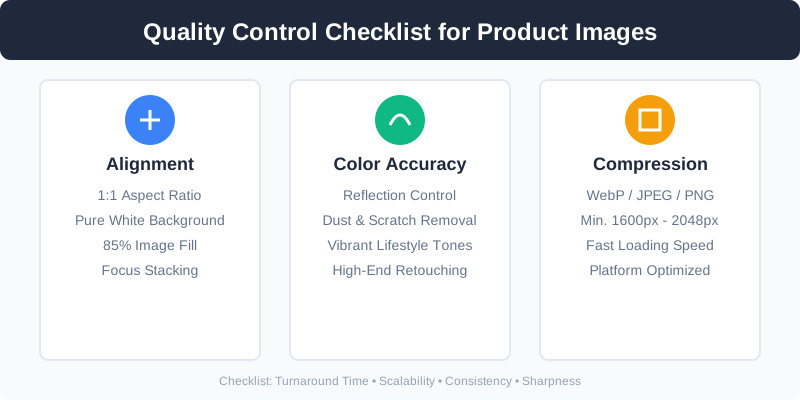
- The Zoom Test: Zoom in at 200%. Are the edges crisp or pixelated?
- The Color Accuracy Test: Does the product on screen match the product in your hand under natural light?
- The Shadow Test: Does the shadow follow the laws of physics based on the light source?
- The "Halo" Check: Is there a faint white or dark glow around the product where the background was removed?
- The Mobile Test: Does the image look clear on a 6-inch smartphone screen? (Over 60% of e-commerce happens on mobile).
Common Pitfalls to Avoid
Even with a great service, sellers often make mistakes that hurt their conversion rates:
- Over-Editing: Making the product look so "perfect" that it looks fake or CGI.
- Inconsistent Lighting: Having different light directions across a single product gallery.
- Ignoring Metadata: Not optimizing the file names for SEO (e.g., using
IMG_001.jpginstead ofblue-ergonomic-office-chair.jpg). - Poor Aspect Ratios: Mixing square images with rectangular ones, creating a "jumpy" experience for the user.
Professional Tips for High-Volume Sellers
If you are managing hundreds of images, organization is as important as editing.
- Use Naming Conventions: Standardize your file names (SKU_Color_Angle.jpg).
- Batch Processing: Never edit one by one. Upload your entire shoot and apply your "Brand Style" in one click.
- A/B Testing: Use your editing service to create two versions of a hero image (e.g., one with a drop shadow, one with a reflection) and see which performs better on your platform.
FAQ: Frequently Asked Questions
Q: Can AI really handle complex items like glass or jewelry? A: While AI has improved significantly, highly reflective or transparent items often benefit from a "Hybrid" approach—using AI for the initial mask and a quick human touch-up for reflections.
Q: Is PNG or WebP better for my website? A: WebP is generally superior for web performance as it offers smaller file sizes with high quality. However, always keep a high-res PNG as your "master" file.
Q: How many images do I need per product? A: For Amazon, aim for 7 images: 1 Main (White background), 3-4 Detail/Feature shots, and 2 Lifestyle/Contextual shots.
Scaling Your Production with SellerCam
For many sellers, the bottleneck isn't the photography—it's the editing. If you are launching 50 new SKUs a month, you cannot afford to wait on a manual editor.
SellerCam transforms your smartphone into a professional studio. By integrating the capture and editing phases into a single AI-powered flow, you eliminate the "file transfer" friction. You get studio-quality results—white backgrounds, optimized lighting, and marketplace-ready files—in the time it takes to send a text message.
Ready to upgrade your product photos? Try SellerCam's AI camera →
Final Thoughts: The ROI of Visual Excellence
Investing in a product image editing service is not an expense; it is a direct investment in your conversion rate. In a world where attention is the most valuable currency, your images are the hook that stops the scroll.
By leveraging AI-driven services, you gain the dual advantage of professional-grade quality and unparalleled speed. Don't let a "good enough" photo be the reason a customer chooses your competitor. In the end, the brands that win are the ones that can produce the most high-quality visual content in the shortest amount of time.

Author

Categories
More Posts

Mastering Background Removal in Figma: A Comprehensive Guide for Designers and Sellers
Learn how to remove backgrounds from images in Figma using AI plugins, manual masking, and external tools. Compare the best methods for speed and quality.
Choosing the Right Amazon Product Image Editing Service: A Strategic Guide
Discover how to choose an Amazon product image editing service that boosts conversions, meets platform requirements, and scales with your brand.

The Ultimate Guide to Ecommerce Product Image Editing and Retouching Services
Master the art of ecommerce image editing. Learn how professional retouching services and AI tools like SellerCam can transform your conversion rates.
Newsletter
Join the community
Subscribe to our newsletter for the latest news and updates