Choosing the Right Amazon Product Image Editing Service: A Strategic Guide
Discover how to choose an Amazon product image editing service that boosts conversions, meets platform requirements, and scales with your brand.
In the hyper-competitive world of Amazon, your product image isn't just a picture; it's your storefront, your salesperson, and your brand ambassador all rolled into one. When a customer scrolls through search results, they don't read your bullet points first—they look at your main image. If that image looks amateurish, cluttered, or fails to meet Amazon’s strict technical standards, you've lost the sale before the page even loads. This is why professional Amazon product image editing services have become a non-negotiable part of a successful seller's toolkit.
However, the "editing service" landscape has shifted. It’s no longer just about hiring a freelancer to clip backgrounds. Today, it involves a sophisticated mix of AI-driven automation, high-end retouching, and strategic infographic design. Whether you are a private label brand or a high-volume reseller, understanding how to leverage these services—and when to use AI tools like SellerCam versus traditional agencies—is the key to dominating your category.
Why Amazon-Specific Editing is Different
Most general photo editors understand how to make a picture look "nice." But Amazon doesn't care about "nice"; Amazon cares about compliance and conversion. An Amazon product image editing service must navigate a complex set of rules that involve color profiles, padding ratios, and file types.
The primary image, for instance, must be on a pure white background (RGB 255, 255, 255). It sounds simple, but achieving a natural-looking shadow on a pure white background without making the product look like it's floating in a void is a technical challenge. Furthermore, the product must occupy at least 85% of the frame. General editors often miss these nuances, leading to suppressed listings or lower click-through rates (CTR).
The Hierarchy of Amazon Visuals
To maximize your sales, your image stack needs to follow a logical progression. Your editing service should provide:
- The Main Image: Pure white background, high resolution, and perfectly retouched.
- Infographics: Highlighting key benefits, dimensions, and unique selling points.
- Lifestyle Images: Showing the product in use to build emotional resonance.
- Comparison Charts: Helping the customer understand why your product beats the competition.
| Image Type | Primary Goal | Key Editing Requirement |
|---|---|---|
| Main Image | Click-Through Rate (CTR) | Pure white background, 85% frame coverage |
| Infographic | Education & Trust | Clean typography, icon design, benefit-driven text |
| Lifestyle | Emotional Connection | Realistic compositing, color grading, lighting match |
| Comparison | Decision Making | Clear layout, visual hierarchy, honest data |
Evaluating Editing Services: Manual vs. AI
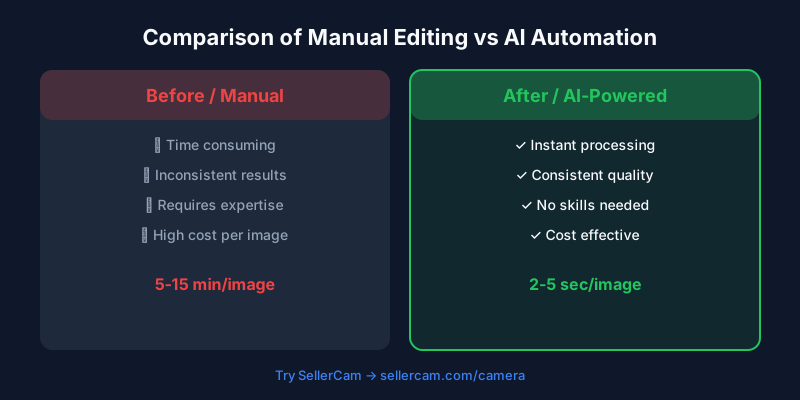
The biggest decision you'll face is choosing between a manual editing agency and an AI-powered platform. Manual services involve sending your RAW or JPEG files to a team of editors who use Photoshop to manually mask and retouch images. While this offers high customization, it is often slow and expensive.
On the other hand, AI-powered tools like SellerCam have revolutionized the "service" aspect. Instead of waiting 24-48 hours for a batch of images, AI can handle background removal, white balance correction, and even "Ghost Mannequin" effects in seconds. For most Amazon sellers, the hybrid approach—using AI for the heavy lifting and manual tweaks for creative infographics—is the most cost-effective path.
The Cost of Quality
When comparing services, don't just look at the per-image price. Look at the "Time to Market." If a service takes three days to return your images, that’s three days of lost sales.
| Feature | Manual Agency | SellerCam (AI Tool) |
|---|---|---|
| Turnaround Time | 24 - 72 Hours | Instant / Seconds |
| Price per Image | $2.00 - $15.00 | Pennies / Subscription |
| Scalability | Limited by Headcount | Unlimited |
| Consistency | Depends on the Editor | Algorithmic / Identical |
| Creative Input | High | Moderate (Prompt-based) |
The Workflow of a Professional Edit
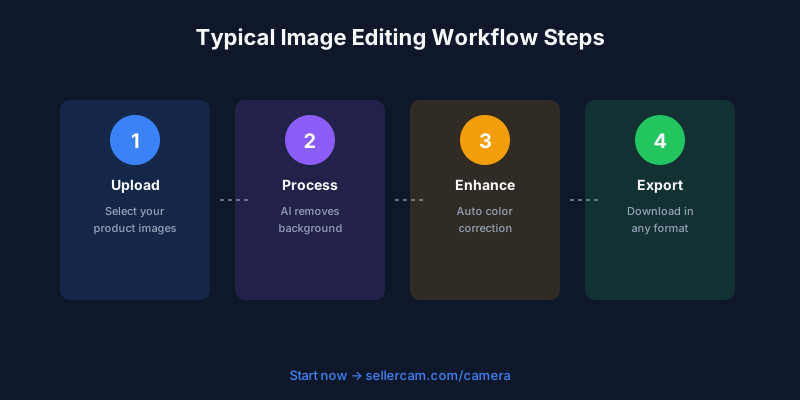
A high-quality Amazon product image editing service follows a specific workflow to ensure the final output is "Amazon-ready." If you are doing this yourself or evaluating a provider, ensure these steps are included:
- Pathing & Masking: Removing the original background with precision, ensuring no "fringing" (bits of the old background) remains around the edges.
- Color Correction: Ensuring the product color in the photo matches the physical product. This prevents "Item Not as Described" returns.
- Shadow Creation: Adding a drop shadow, reflection, or contact shadow to give the product weight and realism.
- Dust & Scratch Removal: Cleaning up manufacturing defects or dust particles that the camera lens captured.
- Resizing & Padding: Exporting to 2000x2000 pixels (or higher) to enable the zoom function, with appropriate white space padding.
Advanced Editing: Infographics and Lifestyle Compositing
Once your main image is perfected, the real work begins with secondary images. Amazon allows up to nine images, though only seven show up on the main page. This is where an editing service proves its worth by creating "Lifestyle Composites."
Buying a professional lifestyle photoshoot can cost thousands. However, a skilled editing service can take your studio product shot and "composite" it into a stock photo of a kitchen, living room, or outdoor setting. The key here is lighting. If the product lighting doesn't match the background lighting, the brain perceives it as "fake," which erodes trust.
Essential Infographic Elements
Your infographics should answer the customer's most common questions before they even read the FAQ section.
- Size Comparisons: Show the product next to a common object (like a phone or a hand) to give a sense of scale.
- Material Callouts: Use "zoom-in" circles to show the texture of the fabric or the quality of the metal.
- Instructional Steps: If the product requires assembly, show a 1-2-3 step visual guide.
| Infographic Goal | Visual Element | Result |
|---|---|---|
| Reduce Returns | Dimension arrows & Scale | Accuracy in expectations |
| Highlight Quality | Close-up texture crops | Perceived value increase |
| Explain Use | "In-action" icons | Lowered barrier to purchase |
Technical Standards You Cannot Ignore
Amazon’s algorithm is sensitive to image quality. If your images are low resolution, your "listing health" score drops. Most services will default to 1000x1000 pixels, but the current gold standard is 1600 pixels or higher on the longest side. This ensures that when a customer hovers their mouse over the image, the zoom is crisp and clear.
Furthermore, the file format matters. While Amazon accepts JPEGs, TIFFs, and GIFs, JPEGs are preferred for their balance of quality and load speed. A professional service will also ensure the sRGB color profile is used, as this is the standard for web browsers. Using CMYK (the print standard) will result in neon, distorted colors on a smartphone screen.
How AI is Changing the Game for Amazon Sellers
The rise of AI has democratized high-quality imagery. Previously, only "Big Brand" sellers could afford a full-time retoucher. Now, with tools like SellerCam, a solo entrepreneur can achieve the same results.
SellerCam’s AI Background Removal isn't just a simple crop; it understands the geometry of the object. It can handle difficult edges like hair, fur, or transparent glass—areas where even professional human editors often struggle. Moreover, the White Background Generator ensures that the "Amazon White" is perfectly consistent across your entire catalog, creating a professional brand appearance.
Pro Tip: Don't just settle for a flat white background. Use SellerCam's AI to generate a subtle "Studio" environment with soft shadows. It keeps you compliant with Amazon's rules while making your product look like it was shot in a $500/hour professional studio.
Making the Final Choice
When selecting your Amazon product image editing service, ask for a sample. Any reputable service should be willing to edit one image for free to demonstrate their skill. Check the edges—are they smooth or jagged? Check the shadows—do they look natural or like a dark blob?
Ultimately, the best service is the one that integrates into your workflow. If you are launching 50 SKUs a month, you need an automated solution. If you are launching one "Hero" product, you might want a manual agency to spend five hours on a single 3D-rendered infographic.
Conclusion: Investing in Your Visual Assets
In the Amazon ecosystem, your images are your most valuable asset. They are the only thing standing between a customer clicking "Add to Cart" or clicking the "Back" button to look at a competitor. Whether you choose a high-end manual service or an agile AI tool like SellerCam, the goal remains the same: clarity, compliance, and conversion.
Don't let poor image quality be the bottleneck of your Amazon business. Start by auditing your current listings. Are your main images truly 255-white? Do your lifestyle images look realistic? If the answer is no, it’s time to look for a professional editing solution.
Ready to transform your Amazon listings? Try SellerCam's AI camera and editing tools today and see the difference professional-grade AI can make for your conversion rates.
Author

Categories
More Posts
How to Remove Background from Image on PowerPoint: The Complete Guide for Sellers
Master the art of background removal in PowerPoint. Learn step-by-step techniques, compare built-in tools with AI alternatives, and optimize your product photos.

Best Photo Editing Software for eBay Sellers: From Professional Suites to AI Automations
Discover the best photo editing software for eBay. Compare professional tools, free editors, and AI-powered solutions to boost your sales and meet eBay's image requirements.
The Ultimate Guide to Ghost Mannequin Photography Studio Setup and Success
Master the art of ghost mannequin photography. Learn studio setup, lighting techniques, and how AI is revolutionizing the invisible mannequin effect for ecommerce.
Newsletter
Join the community
Subscribe to our newsletter for the latest news and updates