
The Ultimate Guide to Ecommerce Product Image Editing and Retouching Services
Master the art of ecommerce image editing. Learn how professional retouching services and AI tools like SellerCam can transform your conversion rates.
In the high-stakes world of online retail, your product images are your silent salespeople. When a customer lands on your page, they don't see the texture of the fabric or feel the weight of the item; they see a digital representation. This is why ecommerce product image editing and retouching services have shifted from being a "luxury" to a foundational requirement for any scaling business.
The gap between a raw photo and a high-converting listing image is filled with technical adjustments, color corrections, and background removals. Whether you are selling on Amazon, Shopify, or Etsy, the quality of your visual content directly correlates with your click-through rate (CTR) and overall trust.
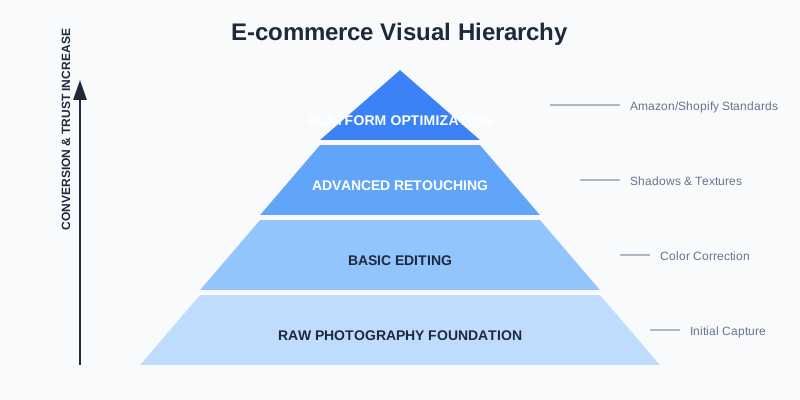
Why High-Quality Retouching is Non-Negotiable
Online shoppers make split-second decisions. A distracting shadow, a slightly off-color product, or a cluttered background can signal a lack of professionalism. Professional retouching ensures that the product looks its absolute best—often better than in real life—while maintaining accuracy.
When we talk about "retouching," we aren't just talking about making things look pretty. We are talking about meeting strict marketplace standards. Amazon, for example, has a notoriously rigid white-background policy. If your images don't meet these specs, your listings could be suppressed, leading to zero sales.
The Psychology of Visual Trust
In a physical store, a customer uses five senses to evaluate a product. Online, they are limited to one: sight. High-quality retouching compensates for this sensory deficit. When an image is crisp, the colors are accurate, and the textures are visible, it reduces the "perceived risk" of the purchase. This psychological comfort is what converts a browser into a buyer.
The Impact of Visual Consistency
Consistency across your product gallery builds brand identity. If one photo is warm-toned and the next is cool-toned, the customer feels uneasy. Retouching services harmonize these elements, ensuring that every thumbnail on your category page looks like it belongs to the same family.
| Feature | Raw Smartphone Photo | Professional Edited Image | Impact on Sales |
|---|---|---|---|
| Background | Natural/Distracting | Pure White or Styled | High Professionalism |
| Colors | Dull/Inaccurate | Vibrant/True-to-Life | Reduced Return Rate |
| Shadows | Harsh/Uncontrolled | Soft/Natural AI-Generated | Better Depth Perception |
| Sharpness | Soft/Blurred | Crisp/Detailed | Increased Trust |
Common Types of Ecommerce Image Editing Services
Not all editing is created equal. Depending on what you sell, you might need a combination of several specialized techniques.
1. Background Removal and Replacement
This is the "bread and butter" of ecommerce. Removing a messy warehouse background and replacing it with a clean, RGB (255, 255, 255) white background is the first step for almost every product. This eliminates distractions and keeps the focus 100% on the item.
2. Color Correction and Matching
Cameras often fail to capture the exact shade of a product, especially under artificial lighting. Color correction ensures that the "Midnight Blue" dress the customer receives is the same "Midnight Blue" they saw on their screen. This is critical for reducing return rates caused by "item not as described."
3. Ghost Mannequin Effect
For apparel sellers, the ghost mannequin (or invisible mannequin) effect is essential. It involves taking multiple shots of a garment on a mannequin and then stitching them together in post-production to make the mannequin disappear, giving the clothes a 3D, "hollow" look. This allows customers to see the fit and shape without the distraction of a plastic model.
4. Image Masking for Complex Edges
When dealing with items like fur, hair, or transparent fabrics, simple clipping paths aren't enough. Image masking uses advanced selection techniques to preserve fine details, ensuring the product doesn't look like it was "hacked out" with scissors.
5. Shadow Creation (Drop, Natural, and Reflection)
Flat images look fake. Adding a subtle drop shadow or a natural contact shadow gives the product weight and dimension. Reflection shadows are particularly popular for luxury items like electronics or high-end cosmetics to add a touch of elegance.
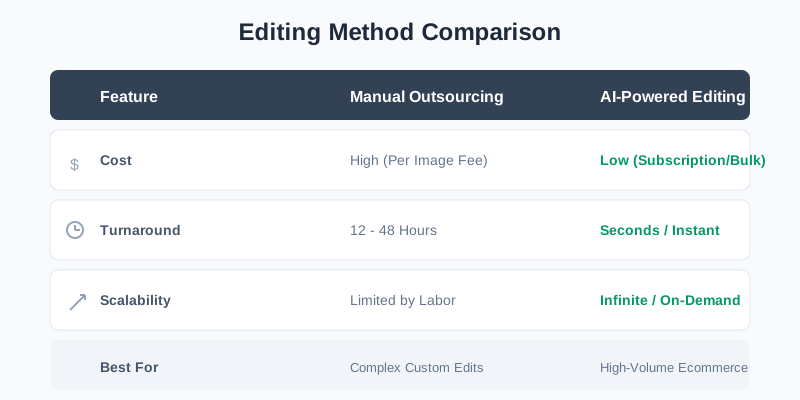
The Shift: Manual Outsourcing vs. AI Tools
Traditionally, sellers had two choices: spend hours in Photoshop themselves or hire an expensive retouching agency. While agencies offer high quality, they often come with 24-48 hour turnaround times and high per-image costs.
The Limitations of Manual Outsourcing
Manual editing is inherently unscalable. If you launch a collection of 500 SKUs, waiting two weeks for edited photos can delay your launch and cost thousands of dollars. Furthermore, human editors can be inconsistent, leading to slight variations in cropping or color balance across a large batch.
The Rise of AI-Powered Efficiency
Today, AI-powered tools like SellerCam are disrupting this workflow. By using advanced neural networks, SellerCam can perform complex background removals and enhancements in seconds rather than hours. This is particularly vital for sellers with high-volume inventories who need to go from "shoot" to "live" as fast as possible.
Pro Tip: If you are using an AI tool, always check the "fine details" like hair or jewelry. SellerCam's AI is specifically trained for these complex edges, which usually trip up generic background removers.
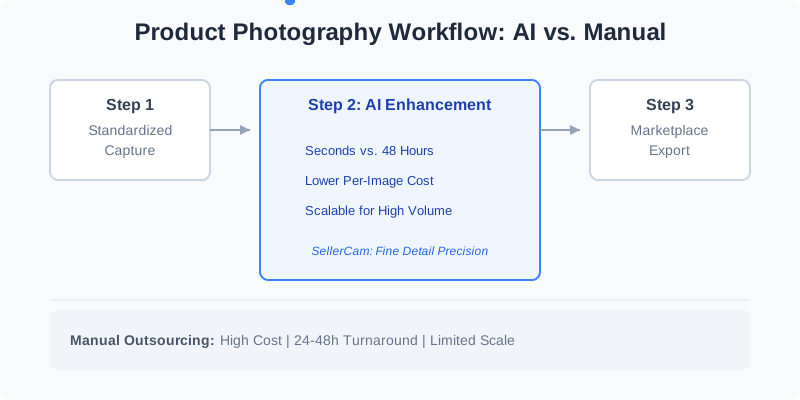
Step-by-Step Workflow for Product Image Success
To get the most out of any retouching service, you need a structured workflow. You can't fix a completely blurry photo in post-production, but you can certainly elevate a decent one.
Step 1: Standardized Capture
Use a consistent setup. Even if you are using a smartphone, keep your lighting and angles the same for every shot. Use a tripod to ensure every photo is taken from the same height and distance.
Step 2: Culling and Selection
Don't waste time editing every single photo. Select the "hero" shot (front view), the side view, the back view, and a close-up of the texture or unique features.
Step 3: Primary AI Processing
Run your selected images through an AI tool like SellerCam to handle the heavy lifting—removing backgrounds, generating natural shadows, and upscaling the resolution. This step usually takes care of 90% of the work.
Step 4: Manual Fine-Tuning (If Necessary)
For extremely high-value items, you might want to spend an extra minute cleaning up tiny imperfections like a stray thread or a fingerprint that the AI might have missed.
Step 5: Platform Optimization
Different platforms have different requirements. You should maintain a master high-resolution file and then export versions specifically for your sales channels.
| Platform | Recommended Format | Minimum Size | Key Requirement |
|---|---|---|---|
| Amazon | JPEG/TIFF | 1600px (long side) | Pure white background (85% image fill) |
| Shopify | WebP/JPEG | 2048 x 2048px | Consistency in aspect ratio (1:1) |
| Etsy | JPEG/PNG | 2000px | Lifestyle and "in-use" shots encouraged |
Advanced Retouching Techniques for High-End Products
For luxury items like jewelry or watches, "basic" editing isn't enough. You need advanced retouching to handle reflections and micro-dust.
- Focus Stacking: This is a technique where you take multiple photos of the same product, each with a different focus point. In post-production, these are merged so that the entire product—from the front diamond to the back clasp—is in sharp focus.
- Reflection Control: Shiny surfaces like silver or glass act like mirrors. Professional retouching involves digitally removing the reflection of the camera, the room, or the photographer, often replacing them with clean, artificial gradients.
- Dust and Scratch Removal: At high resolutions (especially 4K and above), every speck of dust looks like a boulder. Retouching services use "healing" and "cloning" tools to clean these up, making the product look pristine.
- Metal Polishing: In jewelry photography, metals can often look dull. Retouchers use dodging and burning techniques to enhance the highlights and shadows, giving the metal a "lustrous" and expensive feel.
Common Mistakes to Avoid in Product Editing
Even with the best tools, it's easy to overdo it. Here are the most common pitfalls:
- Over-Smoothing Textures: If you're selling a leather bag, the customer wants to see the grain. Over-editing can make it look like plastic, which leads to distrust.
- Unnatural Shadows: Shadows that don't match the light source of the product look "floating" and amateurish.
- Inconsistent Cropping: If your products jump around the frame as the customer clicks through the gallery, it creates a jarring experience. Always center your products with consistent padding.
- Extreme Color Saturation: While you want colors to pop, making them too vibrant can lead to disappointed customers when the actual product arrives looking muted.
Essential Checklist for Choosing an Editing Service
If you decide to hire a service or subscribe to a tool, use this checklist to ensure they meet the demands of modern ecommerce.
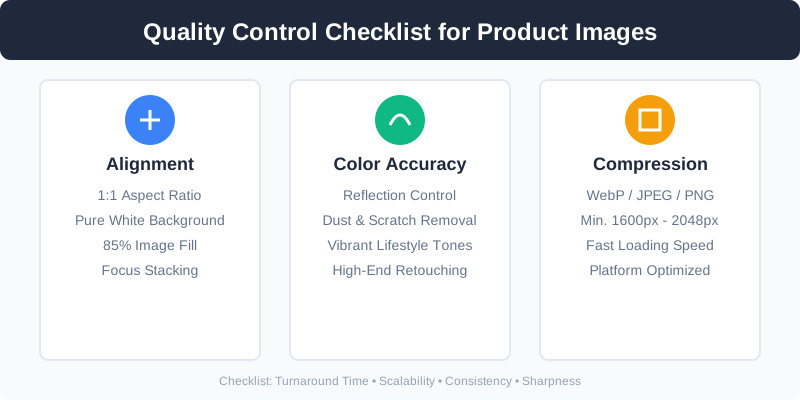
- Turnaround Time: Can they handle seasonal spikes? If you're preparing for Black Friday, you can't wait weeks.
- Scalability: Is there a bulk-upload feature? Manually uploading one image at a time is a productivity killer.
- AI Integration: Do they use modern technology to keep costs low? Services still using 100% manual labor are becoming too slow and expensive.
- Marketplace Presets: Do they provide one-click exports for Amazon, eBay, or Walmart?
- Quality of Edges: Do the cutouts look jagged or smooth? Test with a complex item like a fuzzy sweater.
- Data Security: Are your original high-res assets stored securely?
FAQ: Ecommerce Product Image Editing
How much does professional product image editing cost?
Manual services typically charge between $0.50 to $5.00 per image depending on complexity. AI tools like SellerCam usually offer subscription models that bring the cost down to pennies per image.
Can I use my iPhone for product photography?
Absolutely. Modern smartphones have incredible sensors. The "pro" look comes 20% from the camera and 80% from the lighting and post-production editing.
What is the best file format for ecommerce?
For web use, WebP is the gold standard for speed and quality. However, most marketplaces like Amazon still require JPEG or TIFF. Always keep your original files in a lossless format like PNG or RAW.
How many images should I have per product?
Most high-converting listings have 5-7 images: 1 main hero shot, 2-3 feature callouts, 1-2 lifestyle shots, and 1 size-comparison or "what's in the box" shot.
The Future of Product Visuals: Generative AI
We are entering an era where you don't even need a physical studio. Generative AI can now take a simple photo of a product on a kitchen table and place it in a professional "Lifestyle" setting—like a marble countertop or a sunlit garden.
Virtual Staging
Imagine selling a coffee mug. Instead of flying to a mountain cabin for a "cozy" shoot, AI can generate a realistic wooden table, a soft-focus fireplace background, and natural morning light around your product. This level of storytelling significantly boosts engagement on social media platforms like Instagram and Pinterest.
360-Degree Views
Retouching services are now expanding into video and 360-degree spins. By editing a sequence of 24-72 frames, services can create an interactive experience where the customer can "rotate" the product. This has been shown to increase conversion rates by up to 30% in certain categories.
SellerCam is at the forefront of this, allowing sellers to create "Lifestyle" images without the cost of a location shoot. This level of retouching service was once reserved for brands with million-dollar budgets; now, it's available to anyone with a smartphone.
Conclusion: Investing in Your Digital Storefront
Ecommerce product image editing and retouching services are not just an operational expense; they are an investment in your conversion rate. By moving away from manual, tedious editing and embracing AI-driven workflows, you can save hundreds of hours and thousands of dollars while maintaining a professional edge.
The digital marketplace is more crowded than ever. To stand out, your images must be flawless. They must tell a story of quality, reliability, and professionalism. Whether you are a solo entrepreneur on Etsy or a large-scale Amazon aggregator, the goal remains the same: provide the customer with the clearest, most attractive, and most honest view of your product.
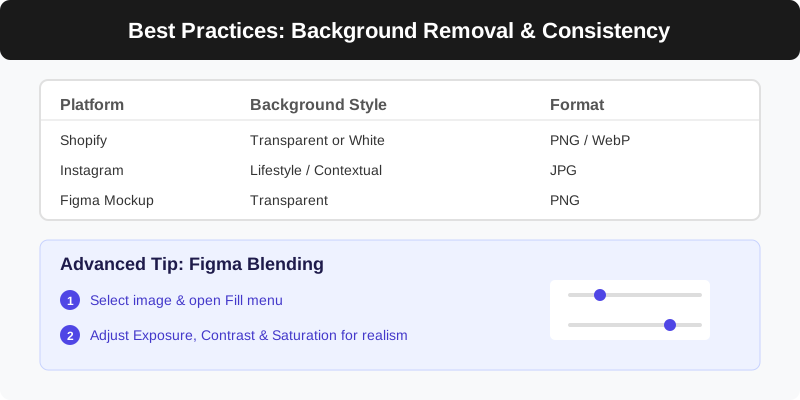
Ready to transform your product gallery? Try SellerCam's AI camera today and see how professional-grade retouching can be achieved in a single click. Stop fighting with complex software and start selling more.
Author

Categories
More Posts
Ghost Mannequin vs. On-Model Images: Which Drives Higher Shopify Conversions?
Discover the impact of ghost mannequin photography versus live model images on Shopify conversion rates. Learn which style fits your brand, cost implications, and how AI is changing the game.

The Ultimate Guide to Choosing a Product Image Editing Service for High-Volume E-commerce
Discover how to choose the right product image editing service, compare AI vs. manual retouching, and optimize your workflow for Amazon, Etsy, and Shopify.

The Ultimate Guide to Clothing Photography: Mastering the Ghost Mannequin Effect
Learn how to achieve the professional ghost mannequin effect for your clothing brand. A deep dive into photography techniques, post-processing, and AI tools.
Newsletter
Join the community
Subscribe to our newsletter for the latest news and updates