
How to Remove Background from Image Using AI: The Definitive Guide for E-commerce
Master the art of AI background removal. Learn how to transform cluttered product shots into professional, marketplace-ready images in seconds using advanced AI tools.
The era of spending hours with the Pen Tool in Photoshop is officially over. For modern e-commerce sellers, the question isn't whether you should use AI to remove backgrounds, but how to do it effectively to maximize sales. Product photography is the most critical factor in a customer's decision-making process, and a clean, distraction-free background is the gold standard for conversion.
In this guide, we will dive deep into the mechanics of AI background removal, compare the best methodologies, and show you how to streamline your workflow to save hundreds of hours every year.
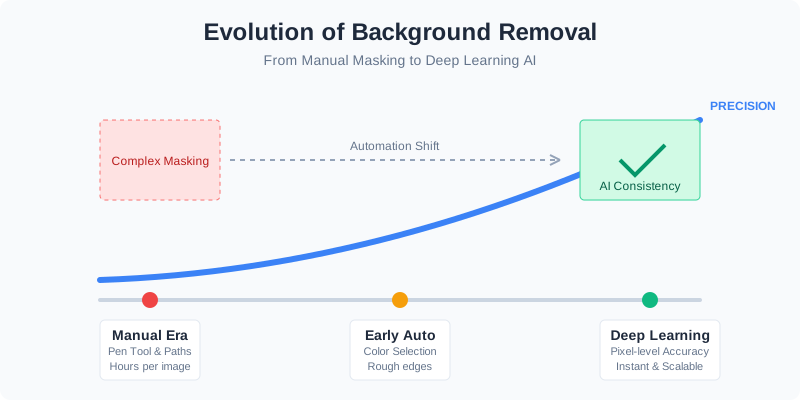
Why AI Background Removal is a Game Changer
Traditional background removal required a specialized skill set. You had to understand paths, feathering, and complex masking. AI has democratized this process by using computer vision and deep learning to distinguish between the "subject" and the "environment" with pixel-level accuracy.
The primary benefit isn't just speed; it's consistency. When you have a catalog of 500 products, ensuring every single one has the exact same shade of white or the same shadow depth is nearly impossible manually. AI handles this at scale, ensuring your brand looks professional across all platforms.
The Impact on Your Bottom Line
When we talk about removing backgrounds, we're really talking about conversion rate optimization (CRO). A cluttered background distracts the eye. A clean background focuses the eye on the product's details, textures, and quality.
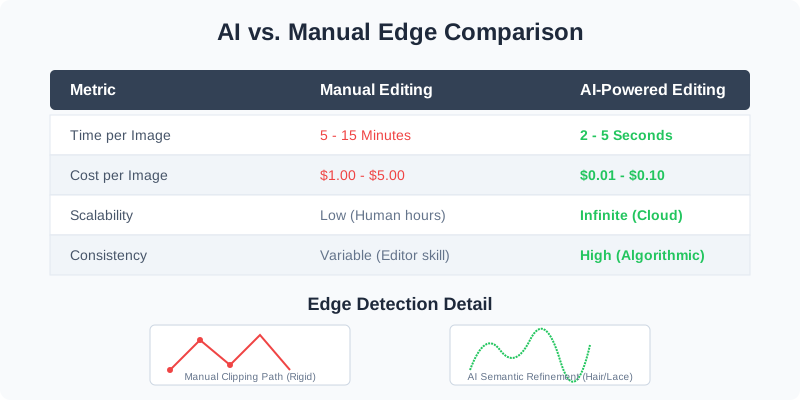
| Metric | Manual Editing | AI-Powered Editing |
|---|---|---|
| Time per Image | 5 - 15 Minutes | 2 - 5 Seconds |
| Cost per Image | $1.00 - $5.00 (Outsourced) | $0.01 - $0.10 |
| Scalability | Low (Limited by human hours) | Infinite (Cloud processing) |
| Consistency | Variable (Depends on the editor) | High (Algorithmic precision) |
Understanding the AI Removal Workflow
How does the AI actually "see" your image? Most modern tools like SellerCam use a combination of Semantic Segmentation and Edge Refinement. The AI first identifies the category of the object (e.g., "This is a leather shoe") and then applies specialized logic to handle difficult edges like fur, lace, or transparent glass.
Deep Dive: Semantic Segmentation vs. Instance Segmentation
To appreciate the complexity of AI, we must look at how neural networks process pixels.
- Semantic Segmentation labels every pixel in an image with a category. It understands that "these pixels are a chair" and "those pixels are the floor."
- Instance Segmentation goes a step further by distinguishing between individual objects of the same type (e.g., separating two different shoes in the same shot).
Modern AI background removers utilize Matting Networks. Unlike standard segmentation which gives a binary "yes/no" for a pixel being in the background, matting calculates "alpha values." This allows for semi-transparency, which is essential for capturing the fine details of hair, smoke, or glass.
Step-by-Step: The AI Transformation Process
Using AI tools typically follows a simple four-stage loop. While the software does the heavy lifting, understanding these steps helps you capture better "input" photos to begin with.
- Image Upload & Analysis: The neural network scans the pixel data to find the primary subject. It looks for depth cues, focus sharpness, and central positioning.
- Alpha Matting: The AI creates a "mask" where white represents the product and black represents the background. Gray areas represent transparency (like the gaps in a wicker basket).
- Edge Smoothing: The software applies anti-aliasing to ensure the transition doesn't look "chopped" or jagged. This is where AI surpasses manual clipping paths, which often look too sharp and artificial.
- Shadow Reconstruction: Advanced AI generates a natural drop shadow or reflection. Without this, a product looks "stuck on" rather than "sitting on" the page.

Comparing AI Background Removal Tools
Not all AI is created equal. Some tools are optimized for portraits (social media), while others are built specifically for the rigorous demands of e-commerce marketplaces like Amazon and Shopify.
1. General Purpose AI (Remove.bg, Adobe Express)
These are great for quick, one-off tasks. They excel at human portraits but often struggle with complex product shapes or metallic surfaces that reflect the background.
2. Professional E-commerce AI (SellerCam)
Tools like SellerCam are trained on millions of product images. They understand the specific geometry of jewelry, electronics, and apparel.
| Feature | Basic AI Apps | Professional E-com AI (SellerCam) |
|---|---|---|
| Batch Processing | Usually limited | Unlimited bulk uploads |
| Resolution | Often downscaled | Keeps original high-res quality |
| Shadow Control | No shadow or "fake" look | Realistic AI-generated shadows |
| Marketplace Compliance | Manual checking required | Presets for Amazon/Etsy/Shopify |
| Camera Integration | Upload only | Real-time AI camera preview |
Real-World Case Studies: Transformation in Action
Case Study A: The Jewelry Retailer
Jewelry is notoriously difficult to edit because of its reflective surfaces and intricate chains. A manual editor might take 20 minutes to mask a diamond necklace. The AI Result: SellerCam's AI identifies the "negative space" within the links of the chain instantly, removing the background without losing the sparkle of the gemstones. This reduced the retailer's "time-to-market" from 3 days to 2 hours.
Case Study B: The Footwear Brand
Shoes often require "contact shadows" to look grounded. Generic background removers often delete these shadows, making the shoes look like they are flying. The AI Result: By using AI that supports "Shadow Preservation," the brand maintained the natural lighting of the original shoot while replacing the messy warehouse floor with a clean, studio-white finish.
Platform-Specific Background Requirements
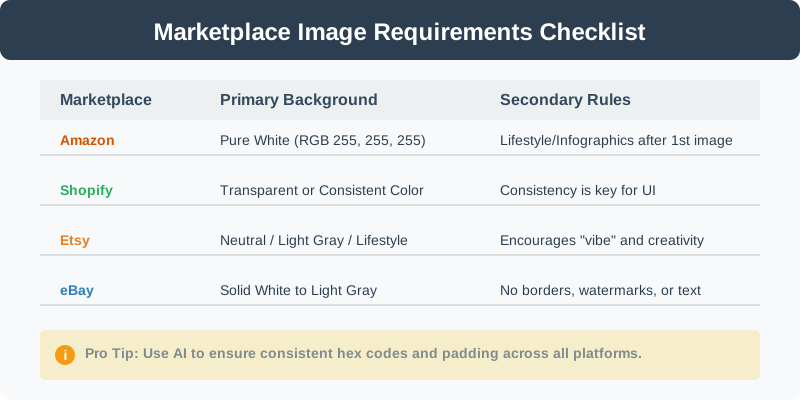
If you are selling on multiple channels, "one size fits all" doesn't always apply. While a white background is the most common requirement, the specific hex codes and padding rules can vary.
| Marketplace | Primary Background Requirement | Secondary Image Rules |
|---|---|---|
| Amazon | Pure White (RGB 255, 255, 255) | Lifestyle/Infographics allowed after 1st image |
| Shopify | Transparent or Consistent Color | No strict rules, but consistency is key for UI |
| Etsy | Neutral/Light Gray or Lifestyle | Encourages "vibe" and creative backgrounds |
| eBay | Solid White to Light Gray | No borders, no watermarks, no text |
Why Amazon is Strict About Pure White
Amazon's search results page is designed to be a seamless grid. If one seller uses a light gray background and another uses pure white, the grid looks "broken." By enforcing RGB 255, 255, 255, Amazon ensures the product is the only thing the customer sees. AI tools make achieving this 100% "Pure White" effortless.
Pro Tips for Better AI Results
Even the best AI works better with high-quality input. To get the most out of your AI background remover, follow these simple photography tips:
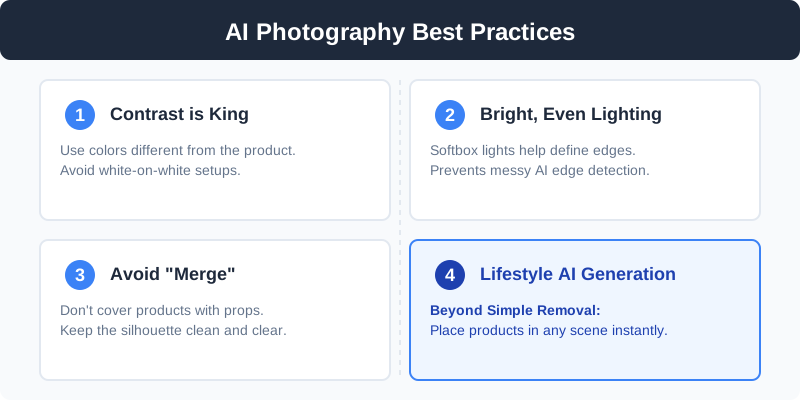
- Contrast is King: Try to shoot your product against a background that is a different color. Avoid shooting a white product on a white table if possible.
- Avoid "Merge": Ensure no part of the product is physically covered by a prop that looks like the product itself.
- Lighting: Bright, even lighting helps the AI distinguish the edges more clearly. Softbox lights are your best friend.
- Depth of Field: Try to keep the entire product in focus. If the back of the product is blurry (bokeh), the AI might struggle to decide where the product ends and the background begins.
- Use the Right Tool: For e-commerce, tools like SellerCam are specifically trained on product shapes, making them far more accurate than generic "portrait" background removers.
Advanced Techniques: Batch Processing and API Integration
For growing businesses, processing images one by one is still too slow. This is where Batch Processing and APIs come into play.
Automating with Batch Processing
If you have a folder of 200 images from a recent photoshoot, you can drag and drop them into a professional AI tool. The AI will apply the same background removal, resizing, and shadow settings to all 200 images simultaneously. This ensures that every image in your "New Arrivals" section looks identical in style.
Developer API for Large Scale
Enterprise-level sellers often integrate AI background removal directly into their PIM (Product Information Management) system. When a raw photo is uploaded to the database, the API automatically triggers the removal process and saves the "clean" version back to the server.
Common Questions (FAQ)
Does AI background removal reduce image quality?
Not if you use professional tools. Basic free web tools often "downsample" your image to save server costs. Professional tools like SellerCam maintain the original resolution (up to 4K or higher), ensuring your zoom-in features on Shopify still look sharp.
Can AI remove backgrounds from transparent objects?
Yes, but it requires "Alpha Matting" capabilities. AI can now detect the difference between a glass bottle and the wall behind it, keeping the glass's transparency while removing the wall's color.
What is the best file format for removed backgrounds?
- PNG: Best for maintaining transparency.
- WebP: Best for web speed (smaller file size with transparency).
- JPG: Use this if you are placing the product on a solid white background (as JPG does not support transparency).
The Future: Beyond Simple Removal
We are moving past the stage where we just "delete" the background. The next generation of AI allows for Background Generation (also known as AI Inpainting).
Imagine taking a photo of a skincare bottle on your desk. AI can not only remove that desk but replace it with:
- A marble countertop in a sunlit bathroom.
- A bed of tropical leaves with water droplets.
- A minimalist wooden shelf with soft shadows.
This "Lifestyle AI" is revolutionary because it eliminates the need for expensive location shoots. You can generate seasonal content (Christmas, Summer, Halloween) using the same base product photo, keeping your marketing fresh without spending a dime on new photography.
Conclusion: Ready to Automate Your Workflow?
Removing backgrounds shouldn't be a bottleneck in your business. By leveraging AI, you can shift your focus from tedious editing to what actually matters: sourcing great products and growing your brand.
The transition from manual editing to AI is not just a trend; it's a fundamental shift in how e-commerce operates. In a world where "content is king," the ability to produce high-quality visual assets at scale is a competitive advantage that cannot be ignored.
Whether you are a solo Etsy seller or a high-volume Shopify merchant, the efficiency gains of AI are undeniable. You save time, reduce costs, and—most importantly—present your products in the best possible light.
Ready to see the difference for yourself? Stop wrestling with manual tools and let the AI do the heavy lifting.
Ready to upgrade your product photos? Try SellerCam's AI camera →
Author

Categories
More Posts

The Ultimate Guide to Clothing Photography: Mastering the Ghost Mannequin Effect
Learn how to achieve the professional ghost mannequin effect for your clothing brand. A deep dive into photography techniques, post-processing, and AI tools.

Mastering Background Removal for Product Images: The Ultimate Seller's Guide
Learn how to remove backgrounds from product images efficiently. Discover pro techniques using AI, manual tools, and platform-specific requirements to boost sales.

How to Remove Background from Image in Google Slides: The Ultimate Professional Guide
Master background removal in Google Slides using built-in AI tools, third-party add-ons, and professional AI cameras to create stunning presentations.
Newsletter
Join the community
Subscribe to our newsletter for the latest news and updates