
Mastering Amazon Product Image Editing: The Ultimate Guide to High-Conversion Visuals
Learn the essential techniques for Amazon product image editing. From technical compliance to AI-powered background removal, discover how to boost your sales with professional visuals.
In the hyper-competitive ecosystem of Amazon, your product image isn't just a picture; it's your virtual storefront, your salesperson, and your brand ambassador all rolled into one. When a customer scrolls through search results, they don't read your bullet points first—they look at your images. If your editing isn't up to par, you're not just losing clicks; you're handing sales to your competitors.
Amazon product image editing is a specialized craft that balances strict technical requirements with psychological triggers. It’s about more than just making a photo look "nice." It’s about creating a visual narrative that answers questions, builds trust, and ultimately drives the "Add to Cart" action.

The Foundation: Technical Compliance vs. Visual Appeal
Before diving into the creative side of editing, we must address the non-negotiables. Amazon is notorious for its strict image guidelines. Failure to comply doesn't just result in poor conversion—it can lead to suppressed listings.
The primary image, or the "Hero" shot, must be on a pure white background (RGB 255, 255, 255). The product should fill at least 85% of the frame. While these rules might seem restrictive, they are designed to create a clean, uniform shopping experience.
| Feature | Amazon Requirement | Optimal Recommendation |
|---|---|---|
| Main Image Background | Pure White (RGB 255,255,255) | Pure White with subtle natural shadow |
| File Format | JPEG, TIFF, PNG, or GIF | High-quality JPEG for faster loading |
| Minimum Resolution | 1000px on the longest side | 2000px x 2000px for high-definition zoom |
| Product Coverage | 85% of the image area | 90% to maximize mobile visibility |
| Color Mode | sRGB or CMYK | sRGB (Standard for web displays) |
Editing for Amazon starts with ensuring these technical boxes are checked. However, professional editors know that "technically correct" is the floor, not the ceiling. The real work begins with color correction, sharpening, and perspective adjustment.
Advanced Editing Techniques for the Modern Seller
Modern Amazon image editing has evolved beyond basic brightness and contrast. Sellers are now utilizing sophisticated post-processing to stand out.
1. The Power of Precise Background Removal
A "white background" isn't always as simple as it sounds. If you simply cut out a product and place it on a white canvas, it often looks "floating" or artificial. Professional editing involves preserving or recreating natural shadows to give the product weight and dimension. This is where tools like SellerCam excel, using AI to distinguish between the product edge and the environment, ensuring a crisp transition without the dreaded "jagged edges."
2. Color Matching and Consistency
Nothing kills a brand's credibility faster than a customer receiving a product that looks different from the photo. Color grading is essential to ensure that the "Navy Blue" on the screen matches the physical item under standard lighting. This involves adjusting the white balance and saturation to account for the "warmth" or "coolness" of the original studio lights.
3. Texture Enhancement and Retouching
High-resolution sensors pick up every speck of dust, fingerprint, or minor manufacturing flaw. Retouching involves cleaning these imperfections without making the product look like a 3D render. The goal is "perfect reality."
Strategic Image Sequencing: Beyond the Main Image
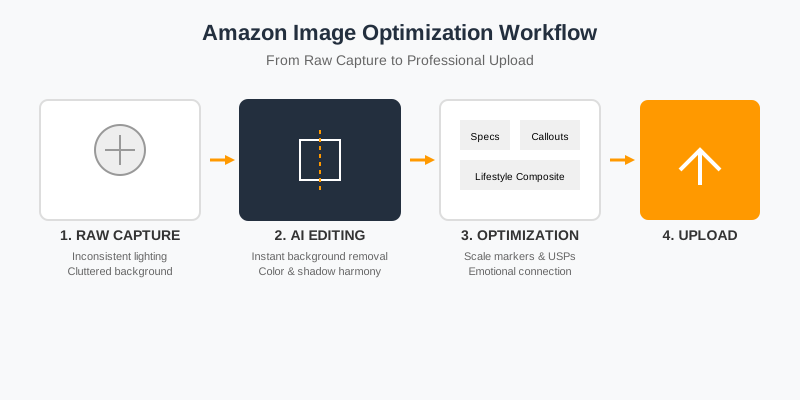
While the main image gets the click, the secondary images close the deal. This is where your editing strategy shifts from "compliance" to "persuasion."
Lifestyle Integration
Editing lifestyle images often involves "compositing"—taking a studio shot of a product and realistically placing it into a stock photo of a home or office. This requires expert matching of light direction, shadow density, and focal depth to ensure the product doesn't look "pasted on."
Infographic Overlays
Infographics are perhaps the most important secondary images. They translate features into benefits. Editing here involves graphic design skills: choosing the right typography, creating call-out icons, and ensuring the text is readable on mobile devices.
| Image Type | Goal | Key Editing Focus |
|---|---|---|
| Main Image | Click-through rate (CTR) | Sharpness, pure white background, 85% scale |
| Dimensions/Specs | Reduce returns | Accurate scale markers, clear typography |
| Feature Callout | Highlight USP | Macro crops, icons, benefit-driven text |
| Lifestyle | Emotional connection | Realistic compositing, color harmony |
| Comparison | Competitive edge | Clear table design, highlight advantages |
The AI Revolution in Amazon Image Editing
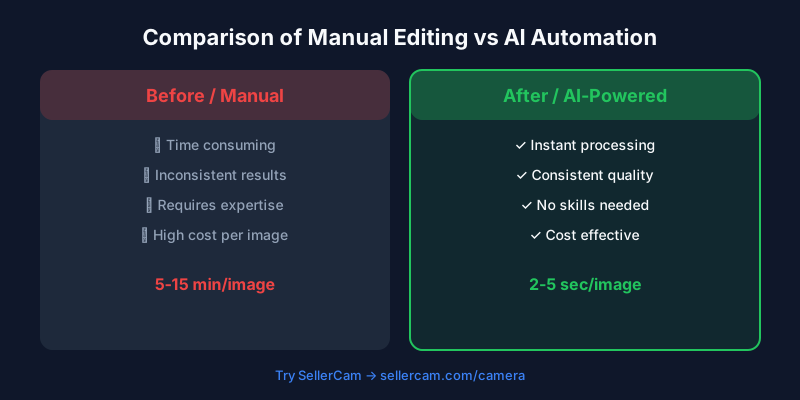
The traditional workflow of sending RAW files to a retouching house and waiting 48 hours is becoming obsolete. AI-driven tools have democratized high-end editing.
The "Before" image above shows a typical raw shot: inconsistent lighting, a cluttered background, and dull colors. The "After" image, processed through SellerCam's AI, demonstrates the power of automated editing. The background is instantly replaced with a compliant white, the colors are boosted for vibrancy, and the product is centered perfectly.
This shift isn't just about speed; it's about consistency. When you have a catalog of 100+ SKUs, manual editing often leads to slight variations in tone and shadow. AI ensures that every single listing looks like it belongs to the same professional brand.
Avoiding Common Editing Pitfalls
Even with the best tools, it's easy to over-edit. Here are the most common mistakes Amazon sellers make during the post-processing phase:
- Over-Smoothing Textures: If you're selling a leather bag, the customer needs to see the grain. Over-editing can make natural materials look like plastic, leading to "item not as described" complaints.
- Inconsistent Shadows: If your main image has a drop shadow but your side views have a reflection, the listing feels disjointed. Pick one shadow style and stick to it.
- Illegible Text on Mobile: Over 50% of Amazon shoppers buy via the app. If your infographic text is too small or has low contrast, it's useless.
- Misleading Color Correction: Cranking up the saturation might make the product pop, but if the actual product is muted, you're inviting negative reviews.
Pro Tip: Always check your edited images on both a high-end monitor and a budget smartphone. What looks clear on a MacBook Pro might be unreadable on a mid-range Android device.
The Business Impact of Professional Editing
Investing time or capital into high-quality image editing isn't an expense—it's an investment with a measurable ROI. Better images lead to higher Click-Through Rates (CTR), which improves your organic ranking. Higher quality secondary images lead to better Conversion Rates (CRV), which lowers your Advertising Cost of Sales (ACOS).
| Metric | Impact of Professional Editing | Why? |
|---|---|---|
| CTR | +15% to 30% | A cleaner, sharper main image stands out in search |
| Conversion Rate | +10% to 25% | Infographics and lifestyle shots build buyer confidence |
| Return Rate | -5% to 10% | Accurate color and scale prevent "expectation gaps" |
| PPC Efficiency | Significant Improvement | High CRV means you pay less per sale from ads |

Integrating SellerCam into Your Workflow
For most sellers, the bottleneck is the "Main Image." Manually masking complex products like jewelry or apparel with "flyaway" hairs or intricate edges can take an hour per photo in Photoshop.
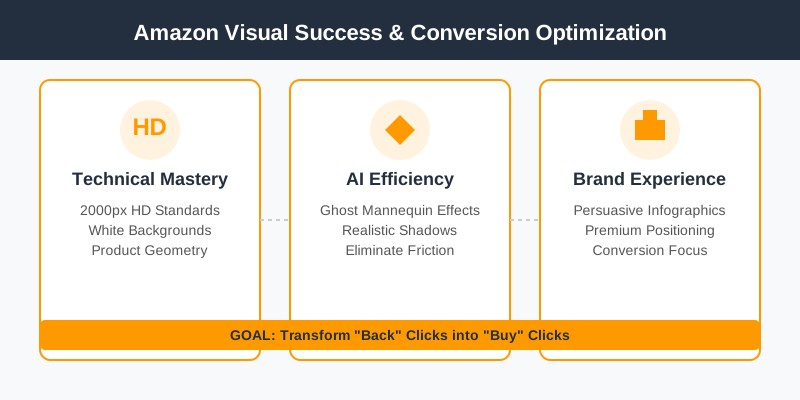
SellerCam simplifies this by allowing you to use your smartphone as a professional studio. The AI doesn't just "remove the background"; it understands the product's geometry. It can apply "Ghost Mannequin" effects for clothing, generate realistic shadows for electronics, and ensure every pixel meets Amazon's 2000px HD standards.
Whether you are a private label seller launching your first product or a large-scale distributor managing thousands of ASINs, the goal of editing remains the same: Eliminate friction.
Conclusion: Visual Excellence as a Competitive Moat
In the world of Amazon, your images are the only thing standing between a "back" click and a "buy" click. By mastering the technical requirements, embracing the persuasive power of infographics, and leveraging AI tools like SellerCam, you transform your listings from "just another product" into a premium brand experience.
Don't let mediocre editing hold back a great product. Start treating your visual assets with the same rigor you treat your SEO and PPC, and the results will follow in your bottom line.
Ready to transform your Amazon presence? Stop struggling with complex editing software. Try SellerCam's AI camera today and generate Amazon-ready product photos in seconds.
Author

Categories
More Posts
Ghost Mannequin vs. On-Model Images: Which Drives Higher Shopify Conversions?
Discover the impact of ghost mannequin photography versus live model images on Shopify conversion rates. Learn which style fits your brand, cost implications, and how AI is changing the game.

How to Remove Background from Image Using AI: The Definitive Guide for E-commerce
Master the art of AI background removal. Learn how to transform cluttered product shots into professional, marketplace-ready images in seconds using advanced AI tools.

Mastering Background Removal for Product Images: The Ultimate Seller's Guide
Learn how to remove backgrounds from product images efficiently. Discover pro techniques using AI, manual tools, and platform-specific requirements to boost sales.
Newsletter
Join the community
Subscribe to our newsletter for the latest news and updates