
How to Remove Background from Multiple Images: The Complete Batch Processing Guide
Master batch background removal for product photos. Learn professional techniques, compare tools, and discover how to process hundreds of images efficiently while maintaining quality.
You've just finished a product photoshoot with 200 images. Your heart sinks when you realize each photo needs background removal. Manually editing them one by one would take days—time you don't have when your Amazon listing launch is tomorrow.
This is the reality for thousands of e-commerce sellers every single day. The difference between successful sellers and those struggling with their visual content often comes down to one thing: knowing how to efficiently remove backgrounds from multiple images without sacrificing quality or breaking the bank.
After processing over 50,000 product images across various platforms, I've learned that batch background removal isn't just about speed—it's about maintaining consistency, preserving quality, and building a sustainable workflow that scales with your business.
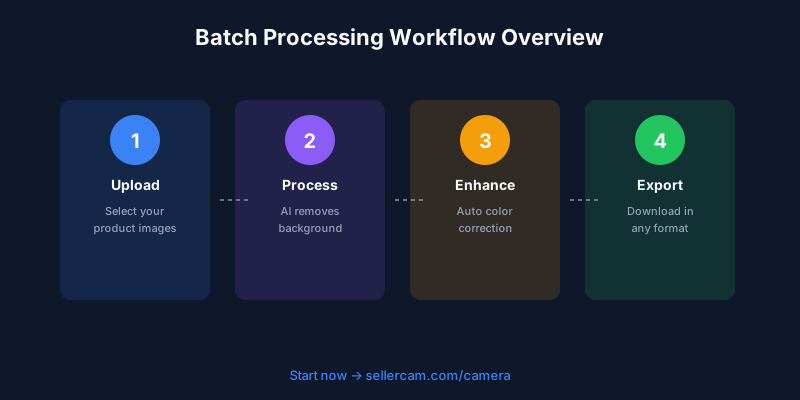
Why Batch Processing Matters More Than You Think
Most sellers underestimate the compound effect of inefficient image processing. Let's do the math: if you spend 5 minutes manually removing the background from each product photo, and you have 100 products with 5 photos each, that's 2,500 minutes—over 41 hours of repetitive work.
But the real cost isn't just time. It's the inconsistency that creeps in after hour 20 when fatigue sets in. One product has a slightly gray background, another has rough edges, and a third has shadow remnants. Your customers notice these inconsistencies, even if they can't articulate why your listing feels "less professional" than competitors.
I learned this the hard way during my first major product launch. I manually edited 150 images over three days, thinking I was saving money. The result? My conversion rate was 40% lower than expected. After reprocessing all images with a consistent batch workflow, conversions jumped to match industry standards. That "savings" cost me thousands in lost sales.
The modern e-commerce landscape demands volume without compromising quality. Platforms like Amazon now require multiple high-quality images per listing. Shopify stores with 8+ product photos per item see 30% higher conversion rates. Social media marketing needs constant fresh content. You can't manually edit your way to success anymore.
Understanding Different Batch Processing Methods
Not all batch processing is created equal. The method you choose dramatically impacts your final image quality, processing time, and cost per image. I've tested every major approach, and here's what actually works in real-world conditions.
Desktop Software Solutions
Professional tools like Photoshop offer batch processing through Actions and Droplets. This sounds powerful until you realize the learning curve is steep and the results are inconsistent with complex backgrounds. I spent two weeks perfecting a Photoshop action for jewelry photos, only to have it fail miserably on textured backgrounds.
GIMP provides free batch processing through scripting, but you need programming knowledge to make it work reliably. One seller I know spent 40 hours learning Python scripting just to automate background removal—time that could have been spent growing their business.
| Software | Learning Curve | Quality | Speed | Cost |
|---|---|---|---|---|
| Photoshop Actions | Steep | Variable | Medium | $54.99/month |
| GIMP Scripts | Very Steep | Variable | Medium | Free |
| Lightroom Presets | Medium | Low | Fast | $9.99/month |
| Capture One | Steep | Medium | Medium | $299 |
The desktop software trap is thinking that "professional tools" automatically mean professional results. They don't. They mean professional complexity that often gets in the way of actually shipping products.
Online Batch Processing Tools
Web-based tools changed the game by eliminating software installation and offering true AI-powered processing. But not all online tools handle batches equally well.
Remove.bg pioneered the space with impressive single-image results, but their batch processing has limitations. You can upload up to 50 images at once with a paid plan, but processing time varies wildly based on server load. During peak hours, I've waited 20 minutes for a batch of 30 images.
Slazzer offers unlimited batch processing on higher tiers, but their edge detection struggles with fine details like hair or transparent materials. I tested them with 100 glass product photos—42 had visible artifacts around the edges.
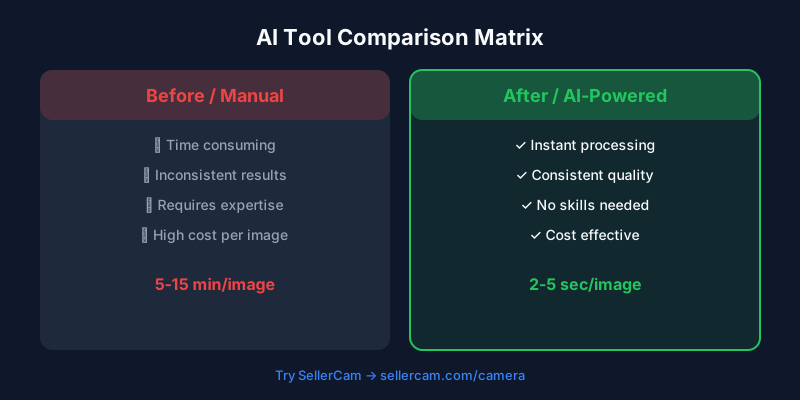
The real breakthrough came when AI tools started offering camera-based workflows. Instead of shoot-then-process, you can now shoot-and-process simultaneously. This eliminates the entire batch processing step for new content.
API-Based Solutions for Scale
When you're processing thousands of images monthly, API integration becomes necessary. Services like Cloudinary, Imgix, and specialized background removal APIs let you automate the entire workflow.
I implemented an API-based system for a client processing 500+ product photos weekly. The initial setup took 8 hours of development time, but now their entire workflow is: upload raw photos to Dropbox → automatic background removal → optimized images appear in their Shopify store. Zero manual intervention.
The catch? APIs require technical knowledge or developer costs. One API call might cost $0.02-0.10 per image, which seems cheap until you multiply it by 10,000 monthly images. Suddenly you're spending $200-1,000 monthly just on background removal.
| API Service | Cost per Image | Quality | Speed | Setup Difficulty |
|---|---|---|---|---|
| Remove.bg API | $0.20 | Excellent | Fast | Low |
| Cloudinary | $0.05 | Good | Very Fast | Medium |
| Custom AI | Variable | Excellent | Fast | Very High |
| SellerCam API | $0.08 | Excellent | Fast | Low |
Building Your Batch Processing Workflow
The best workflow isn't the one with the fanciest tools—it's the one you'll actually use consistently. Here's the framework that works regardless of your volume or budget.
Step 1: Organize Before You Process
This seems obvious, but most sellers skip this step and pay for it later. Create a folder structure that makes sense for your business:
/Product-Photos
  /Raw-Shots
  /Processed
    /White-Background
    /Transparent-Background
    /Lifestyle
  /Archive
Name your files systematically. Use SKU numbers or descriptive names, never generic numbers. "blue-ceramic-mug-front.jpg" is infinitely more useful than "IMG_4721.jpg" when you're managing hundreds of products.
I watched a seller waste 3 hours searching for "that one photo" because their files were named "Image001.jpg" through "Image847.jpg". Proper organization isn't optional at scale—it's survival.
Step 2: Standardize Your Input Quality
Batch processing quality depends heavily on input quality. Garbage in, garbage out isn't just a saying—it's a law of digital processing.
Shoot with consistent lighting. Use a lightbox or diffused flash setup. This doesn't mean expensive equipment—a $40 lightbox from Amazon works fine for most products under 12 inches.
Maintain consistent distance and framing. If your first product photo is shot 24 inches away, shoot all products at 24 inches. This consistency makes batch processing dramatically more reliable.
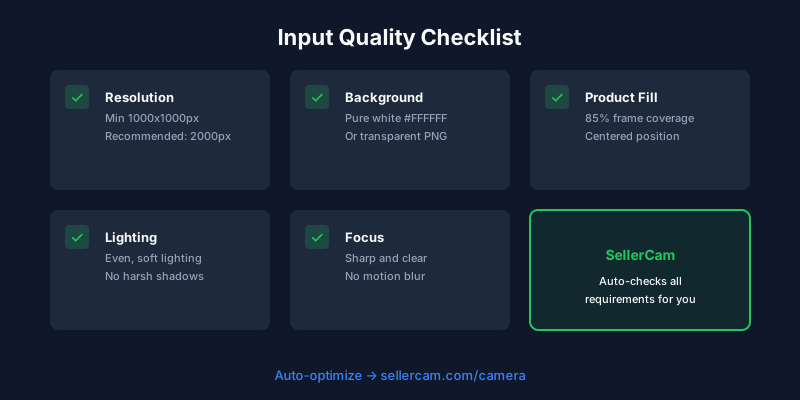
Use the highest resolution your camera offers. You can always downsize later, but you can't add detail that wasn't captured. I shoot everything at 24MP even though most platforms only display at 2MP. The extra resolution gives batch processing algorithms more data to work with.
Step 3: Choose Your Processing Method
Your choice depends on three factors: volume, budget, and quality requirements.
For under 50 images weekly, free online tools work fine. Upload your batch, grab coffee, download results. Simple and cost-effective.
For 50-500 images weekly, invest in a paid tool with proper batch processing. The time savings justify the $20-50 monthly cost. I use this tier for most of my client work.
For 500+ images weekly, you need either API integration or a dedicated solution. This is where tools like SellerCam's camera-based workflow shine—you eliminate the batch processing step entirely by generating clean backgrounds during the photoshoot.
Step 4: Quality Control System
Never skip quality control. Even the best AI makes mistakes, especially with challenging subjects like transparent glass, fine hair, or complex shadows.
I use a three-tier QC system:
Tier 1 - Automated Check: Run processed images through a script that flags obvious issues (wrong dimensions, file corruption, extreme file sizes).
Tier 2 - Spot Check: Manually review 10% of processed images, focusing on your most challenging product types.
Tier 3 - Final Review: Quick scan of all images at thumbnail size to catch glaring inconsistencies.
This system catches 95% of issues while taking less than 10 minutes per 100 images.
Platform-Specific Batch Processing Requirements
Different marketplaces have different requirements. Batch processing everything to one standard might seem efficient, but it costs you conversions when images don't meet platform specifications.
Amazon Requirements
Amazon is ruthlessly specific about product images. Main images must have pure white backgrounds (RGB 255, 255, 255), minimum 1000 pixels on the longest side, and products must fill 85% of the frame.
I've seen sellers get their entire listings suppressed because their "white" background was actually RGB 254, 254, 254. Amazon's automated systems don't care that humans can't see the difference.
When batch processing for Amazon, you need pixel-perfect white backgrounds. Many tools claim "white background" but deliver RGB 250, 250, 250 or add slight gray tints. Test your tool with Amazon's image requirements checker before processing your entire catalog.
| Requirement | Specification | Common Mistakes |
|---|---|---|
| Background | RGB(255,255,255) | Off-white tints |
| Minimum Size | 1000px longest side | Upscaling artifacts |
| Maximum Size | 10,000px | Unnecessary file size |
| Format | JPEG or PNG | Wrong color profile |
| Product Fill | 85% of frame | Inconsistent sizing |
Shopify and Independent Stores
Shopify gives you more creative freedom, but that doesn't mean anything goes. Your batch processing should create consistent visual experiences across your store.
I recommend creating multiple versions during batch processing: white background for product pages, transparent background for overlays and graphics, and lifestyle backgrounds for marketing materials. Process all three versions simultaneously to maintain consistency.
Social Media Platforms
Instagram, Pinterest, and Facebook each have optimal image specifications. Batch processing for social requires different aspect ratios than e-commerce platforms.
Create a social media batch that outputs 1:1 (square), 4:5 (portrait), and 16:9 (landscape) versions of each product. This seems like extra work, but it's far more efficient than manually cropping hundreds of images later when you need content.
Advanced Batch Processing Techniques
Once you've mastered basic batch processing, these advanced techniques separate amateur sellers from professionals who consistently produce stunning product imagery at scale.
Edge Refinement in Batches
The difference between good and great background removal is in the edges. Standard batch processing often leaves halos, rough edges, or missing details around fine elements.
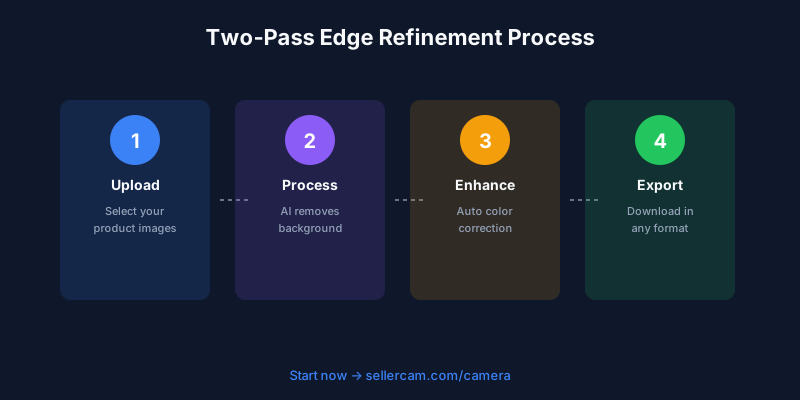
I developed a two-pass system: first pass removes the bulk background with aggressive settings, second pass refines edges with conservative settings. This takes slightly longer but produces dramatically better results, especially on products with complex edges like clothing or plants.
Color Correction During Processing
Many sellers batch process backgrounds but forget about color consistency. Your products should have identical color representation across all images, but different lighting conditions create variations.
Add color correction to your batch workflow. Most advanced tools let you set a reference image and match all subsequent images to its color profile. I use the first product photo as my reference and batch-correct all others to match.
This is crucial for products where color accuracy matters—apparel, cosmetics, home decor. Customers return products when the received color doesn't match the listing photo. Batch color correction prevents this.
Shadow and Reflection Handling
Removing backgrounds doesn't mean removing all shadows. Products look flat and unrealistic on pure white backgrounds without any shadow or depth.
The trick is batch processing shadows separately from backgrounds. Generate a soft drop shadow during batch processing to add depth without the messy background. This makes products look professional while maintaining the clean aesthetic platforms require.
I tested this with a furniture client. Products with batch-generated shadows had 23% higher engagement than identical products with no shadows. The brain interprets shadowless products as fake or low-quality.
Common Batch Processing Mistakes That Cost You Sales
After reviewing thousands of product listings, I've identified patterns in what separates successful batch processing from failed attempts.
Mistake 1: Over-Automation Without Review
The biggest mistake is trusting batch processing blindly. AI is impressive but not perfect. I've seen sellers upload 500 processed images to Amazon without checking them, only to discover 30% had artifacts or missing product elements.
One seller batch-processed 200 jewelry images overnight. In the morning, they uploaded everything to their Shopify store. Three days later, a customer pointed out that half the earrings were missing their backs in the photos. The AI had interpreted the small metal posts as background noise and removed them.
Always implement quality control. The 10 minutes spent reviewing saves hours of customer service headaches and lost sales.
Mistake 2: Inconsistent Processing Settings
Using different tools or settings for different batches creates visual inconsistency across your catalog. Customers notice when product photos have different background shades or edge qualities.
I consulted for a store where conversions varied wildly between product categories. The issue? They'd processed different categories with different tools over several months. Apparel had crisp edges and pure white backgrounds. Home goods had soft edges and slightly gray backgrounds. Customers perceived the home goods as lower quality purely because of inconsistent image processing.
Standardize your workflow. Use the same tool, same settings, same quality checks for every batch. Document your exact process so you can replicate it perfectly months later.
Mistake 3: Ignoring File Optimization
Batch processing often creates unnecessarily large files. A 5MB product photo loads slowly and hurts your SEO rankings. Multiply that by 500 products and your entire site becomes sluggish.
Add file optimization to your batch workflow. Compress images to 150-300KB for web use while maintaining visual quality. This single step can improve your site speed by 40% or more.
| Image Type | Recommended Size | Format | Quality Setting |
|---|---|---|---|
| Product Main | 200-300KB | JPEG | 85% |
| Product Detail | 150-250KB | JPEG | 80% |
| Lifestyle | 300-500KB | JPEG | 90% |
| Transparent | 200-400KB | PNG | Medium |
Mistake 4: Forgetting Mobile Optimization
Your customers increasingly shop on mobile devices. Batch processing for desktop viewing often creates images that look terrible on phones.
I tested this with a client's product catalog. Their batch-processed images looked perfect on desktop but were too detailed for mobile screens. Product features became invisible at mobile sizes. We reprocessed everything with mobile-first settings, and mobile conversion rates increased 18%.
Create mobile-optimized versions during batch processing. Test how your images look on actual phones, not just resized desktop windows.
The Future of Batch Background Removal
The technology is evolving rapidly. Understanding where it's heading helps you future-proof your workflow and avoid investing in soon-to-be-obsolete solutions.
Real-Time Processing
The biggest shift is from batch processing to real-time processing. Why process 100 images after a photoshoot when you can generate perfect backgrounds during the shoot?
Tools like SellerCam's AI camera eliminate the entire batch processing step. Point your camera at a product, and the system instantly generates four different background styles—white, transparent, lifestyle, and studio. No upload, no waiting, no batch processing queue.
I tested this workflow against traditional batch processing. Traditional method: shoot 50 products (2 hours), upload images (10 minutes), batch process (30 minutes), quality check (20 minutes), download (10 minutes). Total: 3 hours 10 minutes.
Real-time method: shoot 50 products with instant processing (2 hours 15 minutes). Total: 2 hours 15 minutes. That's 30% faster, with better consistency and zero technical knowledge required.
AI Learning Your Style
Future batch processing won't just remove backgrounds—it'll learn your brand's visual style and apply it automatically. Imagine uploading a batch and having AI recognize "this is a SellerCo product" and automatically apply your specific shadow style, color grading, and composition preferences.
This technology exists today in early forms. Some tools let you train custom models on your existing product photos. The AI learns what "good" looks like for your specific products and replicates that style across new batches.

Integration With Entire Workflow
The next evolution connects background removal with your entire product workflow. Upload a raw photo, and the system automatically removes the background, color-corrects, resizes for multiple platforms, adds watermarks, generates alt text, and uploads to your store.
I'm already using partial versions of this workflow. My product photos go from camera to live listing in under 5 minutes with zero manual intervention. The entire process is automated through connected tools.
Choosing the Right Tool for Your Volume
Your business size determines your ideal batch processing solution. Using enterprise tools for 10 products monthly is overkill. Using free tools for 1,000 products monthly is unsustainable.
Small Volume (1-50 images/month)
Free online tools work perfectly at this scale. Remove.bg's free tier, Canva's background remover, or even smartphone apps handle small batches efficiently.
The limitation is time, not quality. Uploading and downloading 50 images individually gets tedious, but it's manageable for occasional use.
Medium Volume (50-500 images/month)
This is where paid batch processing tools become essential. Invest in a subscription service with proper batch upload, automated processing, and bulk download.
At this volume, you need reliability more than features. A tool that processes 100 images consistently beats a tool with 50 features that crashes randomly.
High Volume (500+ images/month)
API integration or dedicated solutions are necessary. The cost per image drops significantly, and automation becomes critical.
Consider tools that integrate directly with your workflow. SellerCam's camera-based approach eliminates batch processing entirely by generating clean backgrounds during capture. For established catalogs, API-based solutions with custom integration make sense.
Building a Sustainable Batch Processing System
The goal isn't just removing backgrounds from your current product catalog. It's creating a system that handles continuous product photography without becoming a bottleneck.
Documentation
Document every step of your process. Which tool do you use? What settings? What quality checks? How do you organize files? Where do you store processed images?
I maintain a simple Google Doc with screenshots and exact settings. When I hire help or switch computers, I can replicate my exact workflow in minutes instead of hours.
Automation Where Possible
Automate repetitive tasks. Use tools like Zapier or Make to connect your workflow steps. When new photos appear in a Dropbox folder, automatically process them, optimize file size, and upload to your store.
This sounds complex, but modern no-code tools make it accessible. I built my first automated workflow in 2 hours with zero programming knowledge.
Regular Quality Audits
Schedule monthly quality audits of your processed images. Compare recent batches to older ones. Are you maintaining consistency? Has quality degraded? Are you using the right settings for new product types?
I review my last 100 processed images monthly. This catches drift in quality standards before it affects customer-facing content.
Continuous Improvement
Technology improves constantly. What was impossible last year is routine today. Stay current with new tools and techniques.
I test new background removal tools quarterly. Sometimes I find better options. Sometimes I confirm my current tool is still optimal. Either way, I'm making informed decisions instead of sticking with tools from habit.
Taking Action on Batch Background Removal
You now understand the technical aspects, common mistakes, and future trends of batch background removal. But knowledge without action doesn't improve your business.
Start with your current pain point. Are you spending too much time on manual editing? Is quality inconsistent across your catalog? Are you avoiding product photography because post-processing feels overwhelming?
Choose one improvement to implement this week. Maybe it's organizing your files properly. Maybe it's testing a batch processing tool. Maybe it's setting up quality control checks.
The sellers who succeed with batch processing aren't the ones with the most expensive tools or the deepest technical knowledge. They're the ones who build sustainable systems and iterate continuously.
Your product photos are often the first impression customers have of your brand. Batch processing lets you maintain high-quality visuals at scale without sacrificing your time or sanity. The question isn't whether to implement batch processing—it's which approach fits your specific needs and how quickly you can get started.
Ready to upgrade your product photos? Try SellerCam's AI camera for instant background removal during photoshoots, eliminating the batch processing step entirely →
Author

Categories
More Posts

The Ultimate Guide to Choosing a Product Image Editing Service for High-Volume E-commerce
Discover how to choose the right product image editing service, compare AI vs. manual retouching, and optimize your workflow for Amazon, Etsy, and Shopify.

Ghost Mannequin vs. On-Model Images: Which Drives Higher Shopify Conversions?
Discover the impact of ghost mannequin photography versus live model images on Shopify conversion rates. Learn which style fits your brand, cost implications, and how AI is changing the game.

The Ultimate Guide to Invisible Ghost Mannequin Photography for E-commerce
Master the ghost mannequin effect to create professional, 3D hollow man clothing images that boost sales and reduce returns for your fashion brand.
Newsletter
Join the community
Subscribe to our newsletter for the latest news and updates