
The Ultimate Guide to Ecommerce Product Image Editing Services: Strategy, Quality, and Conversion
Discover how professional ecommerce product image editing services transform raw photos into high-converting assets. Learn about AI vs. manual editing and platform requirements.
In the high-stakes world of online retail, your product image is your storefront, your salesperson, and your brand ambassador all rolled into one. When a customer lands on your page, they don't see the hours of research or the quality of your materials—they see a photograph. If that photograph is dull, cluttered, or inconsistent, the sale is lost before the description is even read. This is where ecommerce product image editing services become the backbone of your digital strategy.
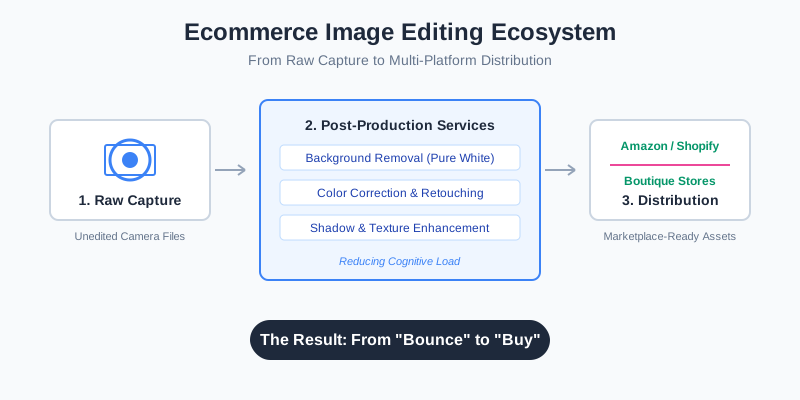
The transition from a raw camera file to a polished, marketplace-ready asset involves a complex series of technical maneuvers. Whether you are managing an Amazon empire or a boutique Shopify store, understanding the nuances of image post-production is no longer optional. It is the difference between a "bounce" and a "buy."
The Psychology of the "Perfect" Product Shot
Why does a clean white background outperform a natural setting in 70% of A/B tests? The answer lies in cognitive load. When a shopper looks at a product, their brain is trying to process its features, texture, and utility. A busy background creates "visual noise" that competes for attention. Professional editing services strip away this noise, allowing the product to speak for itself.
Beyond simple background removal, editing addresses the "trust gap." In physical retail, a customer can touch a fabric or feel the weight of a gadget. In ecommerce, they rely on visual cues for quality. Sharp focus, accurate color representation, and the absence of distracting reflections signal to the customer that the brand is professional and the product is high-quality.
The Impact of Image Quality on Key Metrics
| Metric | Improvement with Professional Editing | Impact on Business |
|---|---|---|
| Click-Through Rate (CTR) | 15% - 30% Increase | More traffic to product detail pages |
| Conversion Rate (CR) | 20% - 50% Increase | More sales from existing traffic |
| Return Rate | 10% - 15% Decrease | Fewer "item not as described" complaints |
| Brand Perception | Significant Uplift | Higher Customer Lifetime Value (CLV) |
Core Services Offered by Image Editing Providers
When you hire a service or use an AI-powered tool like SellerCam, you aren't just "cleaning up" a photo. You are applying a suite of specialized techniques designed for commercial success.
1. Advanced Background Removal and Clipping Paths
This is the bread-and-butter of ecommerce. A clipping path is a closed vector path or shape, used to cut out a 2D image from its background. For complex items like bicycles or jewelry, this requires extreme precision to ensure no "halos" or jagged edges remain.
2. Ghost Mannequin (Invisible Mannequin) Effect
For apparel brands, showing clothes on a flat surface looks uninspiring, but using models for every SKU is expensive. The ghost mannequin effect involves taking multiple shots of a garment on a mannequin and then stitching them together in post-production to make the mannequin disappear. This gives the clothing a 3D, "hollow" look that shows the fit and lining.
3. Color Correction and Swatching
Digital cameras often struggle with specific hues, especially under artificial lighting. Editing services ensure that the "Midnight Blue" sweater on the screen exactly matches the one that arrives in the mail. This involves adjusting white balance, saturation, and brightness to achieve 100% color accuracy.
AI vs. Manual: Choosing the Right Editing Path
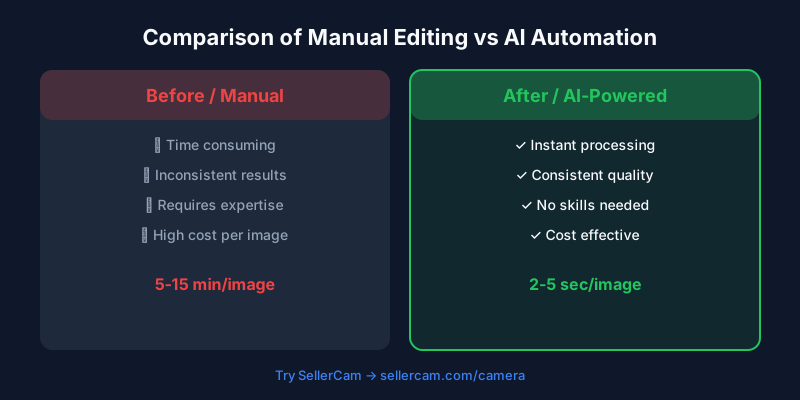
The industry is currently in a state of massive transformation. Traditionally, ecommerce giants sent thousands of images to "clipping houses" in Southeast Asia, where human editors manually traced paths. Today, AI-powered tools like SellerCam have disrupted this model by offering near-instant results at a fraction of the cost.
Manual Editing
- Pros: Handles extremely complex transparency (like fine hair or lace); human eye for creative retouching.
- Cons: Slow turnaround (24-48 hours); expensive for high volumes; inconsistent quality between different editors.
AI-Powered Editing (The SellerCam Approach)
- Pros: Instant results; highly scalable; cost-effective; consistent output.
- Cons: May struggle with extremely niche, low-contrast items (though this gap is closing rapidly).
| Feature | Manual Outsourcing | AI Editing (SellerCam) |
|---|---|---|
| Turnaround Time | 12 - 48 Hours | 2 - 5 Seconds |
| Cost per Image | $0.50 - $5.00 | $0.01 - $0.10 |
| Scalability | Limited by workforce | Infinite |
| Ease of Use | High (send and wait) | Highest (one-click) |
The Workflow of a Professional Edit
Understanding the steps involved helps you prepare your raw shots for the best possible outcome. Even the best editing service cannot fix a completely blurry or poorly lit original.
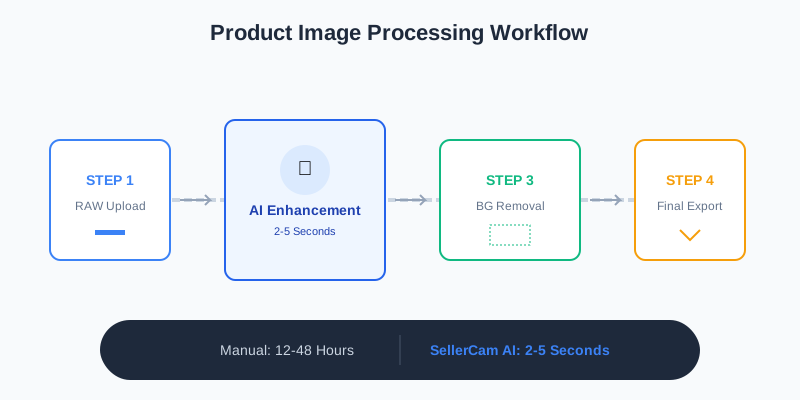
- Image Selection: Filtering out the best angles and ensuring focus is sharp.
- Pathing/Masking: Isolating the product from the background.
- Cleanup: Removing dust, scratches, or temporary labels using "healing" tools.
- Shadow Generation: Adding a drop shadow or reflection to prevent the product from looking like it's "floating" in space.
- Resizing and Formatting: Exporting for specific platform requirements (e.g., 2000px for Amazon zoom functionality).
Platform-Specific Requirements
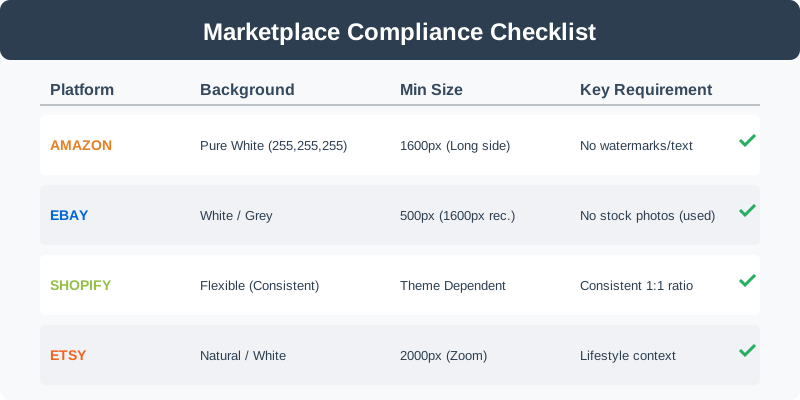
Every marketplace has its own "rulebook." If your images don't comply, your listings might be suppressed, or worse, your account could be flagged. Professional editing services stay updated on these shifting requirements so you don't have to.
| Platform | Primary Image Background | Minimum Size | Mandatory Requirements |
|---|---|---|---|
| Amazon | Pure White (RGB 255,255,255) | 1600px on longest side | No watermarks, text, or inset images |
| eBay | Preferred White/Grey | 500px (1600px recommended) | No "stock" photos for used items |
| Shopify | Flexible (Consistency is key) | Depends on theme | Consistent aspect ratio (usually 1:1) |
| Etsy | Natural or White | 2000px for zoom | Focus on "vibe" and lifestyle context |
Advanced Techniques: Beyond the Basics
Once you have mastered the white background, it's time to look at advanced retouching that drives premium pricing.
Component Color Change
If you sell a water bottle in 12 different colors, you don't necessarily need 12 different photo shoots. A professional service can take one high-quality "master" shot and change the color of the product digitally. This ensures the lighting and angle remain identical across your entire product line, creating a beautiful, uniform look on your collection page.
Texture Enhancement
For products like leather goods, jewelry, or high-end electronics, the "feel" of the surface is vital. Retouchers use frequency separation and dodging/burning to highlight the grain of the leather or the glint of a diamond without making it look artificial.
Why SellerCam is the Modern Choice
In the past, you had to choose between "cheap and fast" or "expensive and good." SellerCam uses advanced neural networks to bridge that gap. By integrating the camera directly with the AI processing engine, we eliminate the friction of traditional editing.
Instead of taking photos, moving them to a computer, uploading them to a service, and waiting a day, SellerCam allows you to:
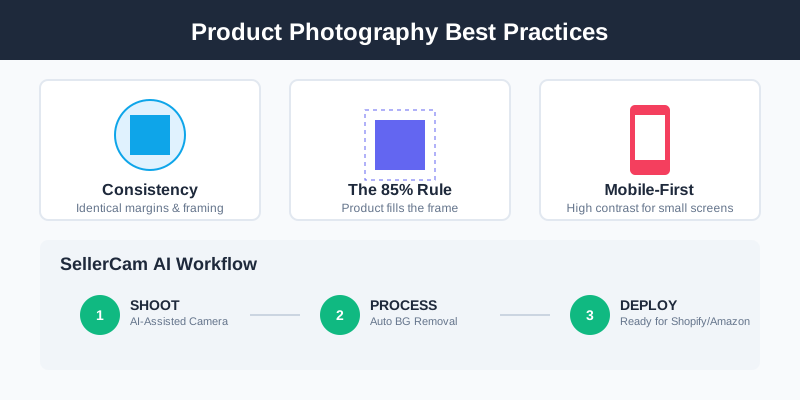
- Shoot: Capture the product using our AI-assisted camera.
- Process: The AI automatically detects the product, removes the background, and balances the lighting.
- Deploy: Your image is ready for Shopify or Amazon in seconds.
Best Practices for High-Converting Images
To get the most out of any editing service, follow these industry-standard best practices:
- Consistency is King: Ensure your margins (the space between the product and the edge of the frame) are identical across all listings.
- The 85% Rule: For Amazon, the product should occupy at least 85% of the frame.
- Show, Don't Just Tell: Use editing to create "infographic images" that highlight specific features or dimensions.
- Mobile-First Editing: Most shoppers are on phones. High-contrast, clear images perform significantly better on small screens.
Conclusion: Investing in Visual Capital
Ecommerce product image editing services are not a luxury; they are a fundamental business investment. In an era where attention spans are measured in milliseconds, your images are the only tool you have to stop the scroll and earn a click.
By leveraging the power of AI through tools like SellerCam, you can achieve professional-grade results without the professional-grade price tag or the grueling wait times of traditional agencies. Start treating your product images as the high-value assets they are, and your conversion rates will follow suit.
Ready to see the difference? Try SellerCam's AI camera today and transform your raw shots into marketplace masterpieces in a single click.
Author

Categories
More Posts

How to Remove Background from Image on Slides: The Ultimate Guide for Professional Presentations
Master the art of removing backgrounds from images in Google Slides and PowerPoint. Learn professional techniques, compare tools, and discover how AI simplifies the process.

The Ultimate Guide to Choosing a Product Image Editing Service for High-Volume E-commerce
Discover how to choose the right product image editing service, compare AI vs. manual retouching, and optimize your workflow for Amazon, Etsy, and Shopify.

How to Remove Background Watermark from Image: A Professional Guide for Sellers
Master the art of removing background watermarks and cleaning product images. Learn professional techniques, legal considerations, and AI tools for high-converting photos.
Newsletter
Join the community
Subscribe to our newsletter for the latest news and updates