
The Ultimate Guide to Best Software to Remove Background from Image for E-commerce
Discover the best software to remove background from images. Compare AI tools, professional software, and batch processors to streamline your e-commerce workflow.
Finding the best software to remove background from image files is no longer just about "erasing" pixels. For modern e-commerce sellers, it’s about speed, edge precision, and maintaining the integrity of product textures. Whether you are selling on Amazon, Etsy, or your own Shopify store, a clean background is the difference between a professional listing and a skipped one.
In this deep dive, we explore the landscape of background removal—from heavyweight professional suites to the new era of AI-powered browser tools like SellerCam that are changing the game for small-to-medium business owners.
Why Background Removal is Non-Negotiable in E-commerce
Before we jump into the software list, let's look at why this process is the backbone of online sales. Most major marketplaces have strict requirements. If your product photo has a cluttered living room in the background, Amazon’s algorithm might suppress your listing before a single customer sees it.
Beyond compliance, there is the psychological factor. A consistent white or transparent background removes distractions, allowing the customer’s eye to focus solely on the product's details, color, and form. Research shows that clean, professional imagery can increase conversion rates by up to 30% because it builds trust and reduces visual noise.
| Marketplace | Background Requirement | Primary Image Rule |
|---|---|---|
| Amazon | Pure White (RGB 255, 255, 255) | Product must fill 85% of the frame |
| eBay | Solid White or Light Grey | No borders, text, or watermarks |
| Etsy | Flexible (Neutral preferred) | High-resolution focus on product |
| Google Shopping | Solid White or Transparent | No promotional text or overlays |
The Top Contenders: Best Software to Remove Background from Image
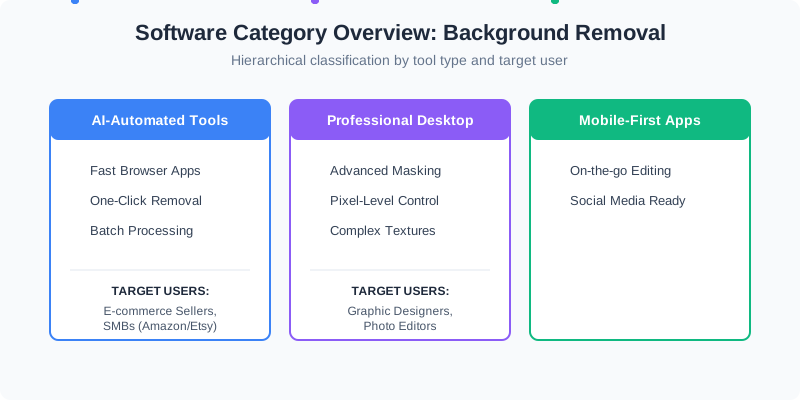
Selecting the "best" software depends heavily on your volume and technical skill. A professional photographer might prefer the manual control of Photoshop, while a busy Shopify merchant needs the "one-click" efficiency of an AI tool.
1. SellerCam: The AI-First Web Solution
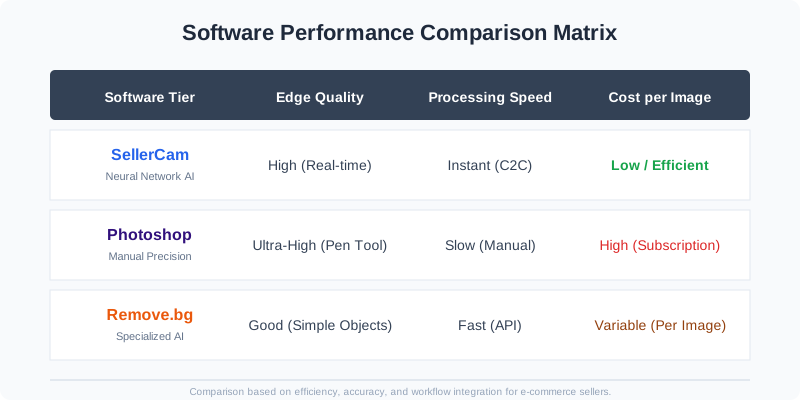
SellerCam represents the cutting edge of browser-based background removal. Unlike traditional software that requires a steep learning curve, SellerCam uses advanced neural networks to distinguish between product edges and complex backgrounds.
What sets it apart is the "Camera-to-Cloud" workflow. You can use your smartphone or webcam to capture the product directly through the SellerCam interface, and the AI handles the background removal in real-time. This eliminates the tedious step of transferring files from a camera to a computer.
Key Benefits for E-commerce:
- Real-time Preview: See the background disappear as you take the photo.
- Marketplace Presets: Automatically resize and pad images for Amazon or eBay.
- Cloud Storage: Keep your product catalog organized without filling up your hard drive.
2. Adobe Photoshop: The Creative Gold Standard
Photoshop remains the most powerful tool for manual refinement. With its "Select Subject" and "Object Selection" tools, it has integrated AI, but its true strength lies in the Pen Tool for hair-thin precision. However, the subscription cost and the time required to process each image make it less ideal for high-volume sellers who don't have a dedicated design team.
When to use Photoshop:
- When the product is highly reflective (like jewelry).
- When you need to combine multiple exposures (HDR).
- When the background and product colors are nearly identical.
3. Remove.bg: The Specialized Specialist
Remove.bg was one of the first dedicated AI background removers. It is excellent for portraits and simple products. While it offers great API integration, the per-image cost can become prohibitive for startups or sellers with thousands of SKUs.
Step-by-Step Guide: How to Remove Backgrounds Effectively
To get the most out of the best software to remove background from image files, follow this professional workflow:
Step 1: Preparation and Lighting
Even the best AI struggles with poor lighting. Ensure your product is well-lit from at least two angles to eliminate harsh, confusing shadows. Use a background that contrasts with the product (e.g., don't shoot a white sneaker on a white sheet).
Step 2: Upload and Initial Pass
Upload your image to your chosen software. If using SellerCam, the AI will automatically identify the subject. For Photoshop, use the 'Select Subject' button as a starting point.
Step 3: Edge Refinement
Look closely at "difficult" areas:
- Hair/Fur: Use a refine edge brush to capture stray strands.
- Transparent areas: Ensure the background visible through glass or plastic is also removed.
- Shadows: Decide if you want to keep the original contact shadow or generate a new one.
Step 4: Exporting for the Web
Always export in a format that supports transparency if you aren't using a solid white background. PNG is the standard for transparency, while WebP offers better compression for faster website loading speeds.
In-Depth Comparison: Efficiency and Accuracy
When evaluating the best software to remove background from image assets, we must look at the "Edge Case" performance. How does the software handle transparent glass? What about the fine fur on a winter coat or the strings of a violin?
| Software Type | Best For | Learning Curve | Processing Speed |
|---|---|---|---|
| AI Web Tools (SellerCam) | E-commerce, High Volume | None (Instant) | < 5 Seconds |
| Desktop Suites (Photoshop) | High-end Retouching | Steep | 5-10 Minutes (Manual) |
| Mobile Apps (Photoroom) | Social Media, Casual | Low | 10-20 Seconds |
| Open Source (GIMP) | Budget-conscious pros | Medium | 10-15 Minutes (Manual) |
The Batch Processing Factor
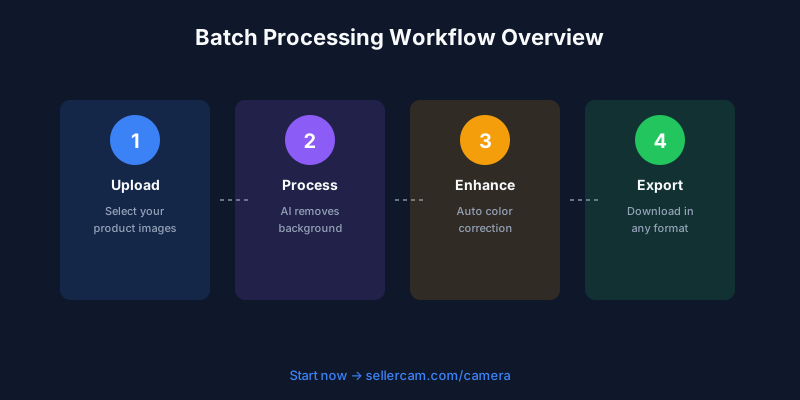
If you have 100 products to list by tomorrow, processing them one by one is a recipe for burnout. The best software to remove background from image files should offer batch processing capabilities. SellerCam and specialized AI tools allow you to upload an entire folder and receive processed, white-background images in minutes.
Professional Tips for High-Quality Results
- Use a Tripod: Even a slight blur can confuse AI edge detection. A steady shot ensures sharp lines.
- Mind the "Spill": If you use a bright green background (chroma key), the green light might reflect onto your product. Neutral grey or white backgrounds are usually safer for e-commerce.
- Check the "Negative Space": Don't forget the holes in handles, the space between a model's arm and torso, or the gaps in a chair back.
- Resolution Matters: Always start with the highest resolution possible. You can always downsize later, but you can't "add" detail back into a pixelated edge.
The Technical Side: How AI Background Removal Works
Modern software doesn't just "look" for colors; it understands objects. Through a process called Semantic Segmentation, the AI identifies the pixels belonging to the "subject" (the product) and those belonging to the "background."
Advanced tools like SellerCam go a step further by applying Alpha Matting. This technique calculates the transparency of pixels at the edge of an object. Instead of a pixel being either "product" or "background," it can be 50% of both. This ensures that if you have a fuzzy sweater, the individual fibers don't look like they were chopped off with a pair of scissors.
Pro Tip: For the best results with any background removal software, ensure there is a clear contrast between your product and the surface it sits on. A dark product on a dark table is the hardest scenario for AI to solve.
Essential Features Checklist for Your Selection
Before committing to a subscription, run through this checklist to ensure the software meets your business needs. Not all "free" tools are actually free when you consider the time lost to fixing their mistakes.
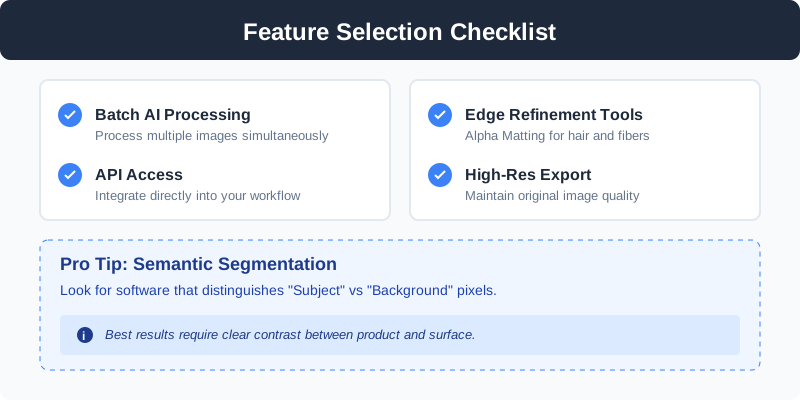
- High-Resolution Export: Does the tool lower the quality of your original image? (SellerCam maintains HD quality).
- Shadow Retention: Can the software preserve or recreate natural shadows? A product floating in white space without a shadow often looks "fake."
- Bulk Upload: Can you handle your entire catalog at once?
- Workflow Integration: Does it connect to your Shopify or Amazon store?
- Refinement Tools: If the AI misses a spot, can you manually brush it out?
Frequently Asked Questions (FAQ)
What is the best free software to remove background from image?
While many tools offer free trials, GIMP is the most powerful completely free open-source desktop software. However, for AI-powered removal, many web tools offer a limited number of free high-res exports per month.
Can I remove backgrounds on my phone?
Yes, apps like Photoroom or the mobile version of SellerCam allow you to take a photo and remove the background instantly. This is ideal for social media selling on platforms like Instagram or Poshmark.
Why does my image look jagged after background removal?
This is usually caused by "Aliasing." High-quality software uses "Anti-aliasing" to smooth out these edges. If your tool doesn't support this, try starting with a larger source image.
Is AI background removal better than manual masking?
For 90% of e-commerce products, AI is now faster and just as accurate as manual masking. Manual masking is only necessary for extremely complex items like fine jewelry, lace, or transparent liquids.
Common Pitfalls to Avoid
Even with the best software, certain mistakes can ruin your product presentation.
- Over-Smoothing: Some AI tools "eat" into the product edges to ensure no background remains. This can change the shape of your product.
- Haloing: This happens when a thin line of the original background remains around the product. It’s particularly noticeable when moving a product from a dark background to a white one.
- Lighting Mismatch: If you remove a background from a photo taken in warm, yellow light and place it on a cool white background, the product will look out of place.
| Problem | Cause | Solution |
|---|---|---|
| Jagged Edges | Low-resolution source | Use high-res images and AI with Alpha Matting |
| Disappearing Parts | Color of product matches background | Increase contrast during photography |
| Flat Appearance | Lack of shadows | Use software that supports "Natural Shadow" generation |
Future Trends: The Rise of Generative AI
We are moving beyond simple removal. The next phase of the best software to remove background from image files involves Background Replacement.
Instead of just a white void, AI can now generate a lifestyle scene—a coffee mug on a wooden table with soft morning sunlight—without you ever leaving your office. This is known as "In-context" rendering. SellerCam is at the forefront of this, allowing sellers to toggle between marketplace-compliant white backgrounds and high-converting lifestyle scenes generated by AI. This saves thousands of dollars on professional set design and location scouting.

Conclusion: Which Software Should You Choose?
The quest for the best software to remove background from image assets ends with understanding your specific workflow.
If you are a professional retoucher working on a high-budget fashion editorial where every single hair strand must be manually adjusted for a billboard, Adobe Photoshop remains your best bet for pixel-perfect control.
However, for 95% of e-commerce sellers, the "best" software is the one that gets the job done accurately, quickly, and at scale. Tools like SellerCam offer the perfect balance of AI sophistication and ease of use. By integrating the camera directly with the removal engine and offering batch processing, it solves the workflow bottleneck that slows down most online businesses.
Don't let tedious editing hold back your business growth. By choosing the right software, you can transform a weekend-long editing chore into a five-minute automated task.
Ready to see the difference for yourself? Stop spending hours on manual masking and start focusing on growing your sales.
Ready to upgrade your product photos? Try SellerCam's AI camera →
作者

分类
更多文章

The Ultimate Guide to Ghost Mannequin Photography Studio Setup and Success
Master the art of ghost mannequin photography. Learn studio setup, lighting techniques, and how AI is revolutionizing the invisible mannequin effect for ecommerce.
The Ultimate Guide to eBay Photo Editing Software: Professional Results Without the Learning Curve
Discover the best eBay photo editing software to boost your sales. Compare AI tools, free editors, and professional suites to meet eBay's image requirements.
AI 如何革新内容创作:从缩略图到演示视频
2025 年,AI 不仅撰写文本——它正在生成整个视觉工作流。深入了解 Veo 3、Runway Gen-4 和 Kling 等工具如何为创作者和营销人员带来革命性改变。
邮件列表
加入我们的社区
订阅邮件列表,及时获取最新消息和更新